

Machine learning lineage is critical in any robust ML system. It lets you track data and model versions, ensuring reproducibility, auditability, and compliance.
While many services for tracking ML lineage exist, creating a comprehensive and manageable lineage often proves complicated.
In this article, I’ll walk you through integrating a comprehensive ML lineage solution for an ML application deployed on serverless AWS Lambda, covering the end-to-end pipeline stages:
-
ETL pipeline
-
Data drift detection
-
Preprocessing
-
Model tuning
-
Risk and fairness evaluation.
Table of Contents
Prerequisites:
-
Knowledge of key Machine Learning / Deep Learning concepts including the full lifecycle: data handling, model training, tuning, and validation.
-
Proficiency in Python, with experience using major ML libraries.
-
Basic understanding of DevOps principles.
Tools we’ll use:
Here is a summary of the tools we’re going to use to track the ML lineage:
-
DVC: An open-source version system for data. Used to track the ML lineage.
-
AWS S3: A secure object storage service from AWS. Used as a remote storage.
-
Evently AI: An open-source ML and LLM observability framework. Used to detect data drift.
-
Prefect: A workflow orchestration engine. Used to manage the schedule run of the lineage.
Machine learning (ML) lineage is a framework for tracking and understanding the complete lifecycle of a machine learning model.
It contains information at different levels such as:
-
Code: The scripts, libraries, and configurations for model training.
-
Data: The original data, transformations, and features.
-
Experiments: Training runs, hyperparameter tuning results.
-
Models: The trained models and their versions.
-
Predictions: The outputs of deployed models.
ML lineage is essential for multiple reasons:
-
Reproducibility: Recreate the same model and prediction for validation.
-
Root cause analysis: Trace back to the data, code, or configuration change when a model fails in production.
-
Compliance: Some regulated industries require proof of model training to ensure fairness, transparency, and adherence to laws like GDPR and the EU AI Act.
What We’ll Build
In this project, I’ll integrate an ML lineage into this price prediction system built on AWS Lambda architecture using DVC, an open-source version control system for ML applications.
The below diagram illustrates the system architecture and the ML lineage we’ll integrate:

Figure A: A comprehensive ML lineage for an ML application on serverless Lambda (Created by Kuriko IWAI)
The System Architecture: AI Pricing for Retailers
The system operates as a containerized, serverless microservice designed to provide optimal price recommendations to maximize retailer sales.
Its core intelligence comes from AI models trained on historical purchase data to predict the quantity of the product sold at various prices, allowing sellers to determine the best price.
For consistent deployment, the prediction logic and its dependencies are packaged into a Docker container image and stored in AWS ECR (Elastic Container Registry).
The prediction is then served by an AWS Lambda function, which retrieves and runs the container from ECR and exposes the result via AWS API Gateway for the Flask application to consume.
If you want to see how to build this from the ground up, you can follow along with my tutorial How to Build a Machine Learning System on Serverless Architecture.
The ML Lineage
In the system, GitHub handles the code lineage, while DVC captures the lineage of:
-
Data (blue boxes): ETL and preprocessing.
-
Experiments (light orange): Hyperparamters tuning and validation.
-
Models and Prediction (dark orange): Final model artifacts and prediction results.
DVC tracks the lineage through separate stages, from data extraction to fairness testing (yellow rows in Figure A).
For each stage, DVC uses an MD5 or SHA256 hash to track and push metadata like artifacts, metrics, and reports to its remote on AWS S3.
The pipeline incorporates Evently AI to handle data drift tests, which are essential for identifying shifts in data distributions that could compromise the model’s generalization capabilities in production.
Only models that successfully pass both the data drift and fairness tests can serve predictions via the AWS API gateway (red box in Figure A).
Lastly, this entire lineage process is triggered weekly by the open-source workflow scheduler, Prefect.
Prefect prompts DVC to check for updates in data and scripts, and executes the full lineage process if changes are detected.
Workflow in Action
The building process involves five main steps:
-
Initiate a DVC project
-
Define the lineage stages with the DVC script
dvc.yamland corresponding Python script -
Deploy the DVC project
-
Configure scheduled run with Prefect
-
Deploy the application
Let’s walk through each step together.
Step 1: Initiating a DVC Project
The first step is to initiate a DVC project:
$dvc init This command automatically creates a .dvc directory at the root of the project folder:
. .dvc/ │ └── cache/ # [.gitignore] store dvc caches (cached actual data files) └── tmp/ # [.gitignore] └── .gitignore # gitignore cache, tmp, and config.local └── config # dvc config for production └── config.local # [.gitignore] dvc config for local DVC maintains a fast, lightweight Git repository by separating the original data in large files from the repository.
The process involves caching the original data in the local .dvc/cache directory, creating a small .dvc metadata file which contains an MD5 hash and a link to the original data file path, pushing only the small metadata files to Git, and pushing the original data to the DVC remote.
Step 2: The ML Lineage
Next, we’ll configure the ML lineage with the following stages:
-
etl_pipeline: Extract, clean, impute the original data and perform feature engineering. -
data_drift_check: Run data drift tests. If they fail, the system exits. -
preprocess: Create training, validation, and test datasets. -
tune_primary_model: Tune hyperparameters and train the model. -
inference_primary_model: Perform inference on the test dataset. -
assess_model_risk: Runs risk and fairness tests.
Each stage requires defining the DVC command and its corresponding Python script.
Let’s get started.
Stage 1: The ETL Pipeline
The first stage is to extract, clean, impute the original data, and perform feature engineering.
DVC Configuration
We’ll create the dvc.yaml file at the root of the project directory and add the etl_pipeline stage:
dvc.yaml
stages: etl_pipeline: # the main command dvc will run in this stage cmd: python src/data_handling/etl_pipeline.py # dependencies necessary to run the main command deps: - src/data_handling/etl_pipeline.py - src/data_handling/ - src/_utils/ # output paths for dvc to track outs: - data/original_df.parquet - data/processed_df.parquet The dvc.yaml file defines a sequence of steps (stages) using sections like:
-
cmd: The shell command to be executed for that stage -
deps: Dependencies that need to run thecmd -
prams: Default parameters for thecmddefined in theparams.yamlfile -
metrics: The metrics files to track -
reports: The report files to track -
plots: The DVC plot files for visualization -
outs: The output files produced by thecmd, which DVC will track
The configuration helps DVC ensure reproducibility by explicitly listing dependencies, outputs, and the commands of each stage. It also helps it manage the lineage by establishing a Directed Acyclic Graph (DAG) of the workflow, linking each stage to the next.
Python Scripts
Next, let’s add Python scripts, ensuring the data is stored using the file paths specified in the outs section of the dvc.yaml file:
src/data_handling/etl_pipeline.py:
import os import argparse import src.data_handling.scripts as scripts from src._utils import main_logger def etl_pipeline(): # extract the entire data df = scripts.extract_original_dataframe() # load perquet file ORIGINAL_DF_PATH = os.path.join('data', 'original_df.parquet') df.to_parquet(ORIGINAL_DF_PATH, index=False) # dvc tracked # transform df = scripts.structure_missing_values(df=df) df = scripts.handle_feature_engineering(df=df) PROCESSED_DF_PATH = os.path.join('data', 'processed_df.parquet') df.to_parquet(PROCESSED_DF_PATH, index=False) # dvc tracked return df # for dvc execution if __name__ == '__main__': parser = argparse.ArgumentParser(description="run etl pipeline") parser.add_argument('--stockcode', type=str, default='', help="specific stockcode to process. empty runs full pipeline.") parser.add_argument('--impute', action='store_true', help="flag to create imputation values") args = parser.parse_args() etl_pipeline(stockcode=args.stockcode, impute_stockcode=args.impute) Outputs
The original and structured data in Pandas’ DataFrames are stored in the DVC cache:
-
data/original_df.parquet -
data/processed_df.parquet
Stage 2: The Data Drift Check
Before jumping into preprocessing, we’ll run data drift tests to ensure any notable drift is in the data. To do this, we’ll use EventlyAI, an open-source ML and LLM observability framework.
What is Data Drift?
Data drift refers to any changes in the statistical properties like the mean, variance, or distribution of the data that the model is trained on.
There are three main types of data drift:
-
Covariate Drift (Feature Drift): A change in the input feature distribution.
-
Prior Probability Drift (Label Drift): A change in the target variable distribution.
-
Concept Drift: A change in the relationship between the input data and the target variable.
Data drift compromises the model’s generalization capabilities over time, making its detection after deployment crucial.
DVC Configuration
We’ll add the data_drift_check stage right after the etl_pipeline stage:
dvc.yaml:
stages: etl_pipeline: ### data_drift_check: # the main command dvc will run in this stage cmd: > python src/data_handling/report_data_drift.py data/processed/processed_df.csv data/processed_df_${params.stockcode}.parquet reports/data_drift_report_${params.stockcode}.html metrics/data_drift_${params.stockcode}.json ${params.stockcode} # default values to the parameters (defined in the param.yaml file) params: - params.stockcode # dependencies necessary to run the main command deps: - src/data_handling/report_data_drift.py - src/ # output file pathes for dvc to track plots: - reports/data_drift_report_${params.stockcode}.html: metrics: - metrics/data_drift_${params.stockcode}.json: type: json Then, add default values to the parameters passed to the DVC command:
params.yaml:
params: stockcode: <STOCKCODE OF CHOICE> Python Scripts
After generating an API token from the EventlyAI workplace, we’ll add a Python script to detect data drift and store the results in the metrics variable:
src/data_handling/report_data_drift.py:
import os import sys import json import pandas as pd import datetime from dotenv import load_dotenv from evidently import Dataset, DataDefinition, Report from evidently.presets import DataDriftPreset from evidently.ui.workspace import CloudWorkspace import src.data_handling.scripts as scripts from src._utils import main_logger if __name__ == '__main__': # initiate evently cloud workspace load_dotenv(override=True) ws = CloudWorkspace(token=os.getenv('EVENTLY_API_TOKEN'), url='https://app.evidently.cloud') # retrieve evently project project = ws.get_project('EVENTLY AI PROJECT ID') # retrieve paths from the command line args REFERENCE_DATA_PATH = sys.argv[1] CURRENT_DATA_PATH = sys.argv[2] REPORT_OUTPUT_PATH = sys.argv[3] METRICS_OUTPUT_PATH = sys.argv[4] STOCKCODE = sys.argv[5] # create folders if not exist os.makedirs(os.path.dirname(REPORT_OUTPUT_PATH), exist_ok=True) os.makedirs(os.path.dirname(METRICS_OUTPUT_PATH), exist_ok=True) # extract datasets reference_data_full = pd.read_csv(REFERENCE_DATA_PATH) reference_data_stockcode = reference_data_full[reference_data_full['stockcode'] == STOCKCODE] current_data_stockcode = pd.read_parquet(CURRENT_DATA_PATH) # define data schema nums, cats = scripts.categorize_num_cat_cols(df=reference_data_stockcode) for col in nums: current_data_stockcode[col] = pd.to_numeric(current_data_stockcode[col], errors='coerce') schema = DataDefinition(numerical_columns=nums, categorical_columns=cats) # define evently dataset w/ the data schema eval_data_1 = Dataset.from_pandas(reference_data_stockcode, data_definition=schema) eval_data_2 = Dataset.from_pandas(current_data_stockcode, data_definition=schema) # execute drift detection report = Report(metrics=[DataDriftPreset()]) data_eval = report.run(reference_data=eval_data_1, current_data=eval_data_2) data_eval.save_html(REPORT_OUTPUT_PATH) # create metrics for dvc tracking report_dict = json.loads(data_eval.json()) num_drifts = report_dict['metrics'][0]['value']['count'] shared_drifts = report_dict['metrics'][0]['value']['share'] metrics = dict( drift_detected=bool(num_drifts > 0.0), num_drifts=num_drifts, shared_drifts=shared_drifts, num_cols=nums, cat_cols=cats, stockcode=STOCKCODE, timestamp=datetime.datetime.now().isoformat(), ) # load metrics file with open(METRICS_OUTPUT_PATH, 'w') as f: json.dump(metrics, f, indent=4) main_logger.info(f'... drift metrics saved to {METRICS_OUTPUT_PATH}... ') # stop the system if data drift is found if num_drifts > 0.0: sys.exit('❌ FATAL: data drift detected. stopping pipeline') If data drift is found, the script immediately exits using the final sys.exit command.
Outputs
The script generates two files that DVC will track:
-
reports/data_drift_report.html: The data drift report in a HTML file. -
metrics/data_drift.json: The data drift metics in a JSON file including drift results along with feature columns and a timestamp:
metrics/data_drift.json:
{ "drift_detected": false, "num_drifts": 0.0, "shared_drifts": 0.0, "num_cols": [ "invoiceno", "invoicedate", "unitprice", "product_avg_quantity_last_month", "product_max_price_all_time", "unitprice_vs_max", "unitprice_to_avg", "unitprice_squared", "unitprice_log" ], "cat_cols": [ "stockcode", "customerid", "country", "year", "year_month", "day_of_week", "is_registered" ], "timestamp": "2025-10-07T00:24:29.899495" } The drift test results are also available on the Evently workplace dashboard for further analysis:

Figure B. Screenshot of the Evently workspace dashboard
Stage 3: Preprocessing
If no data drift is detected, the linage moves onto the preprocessing stage.
DVC Configuration
We’ll add the preprocess stage right after the data_drift_check stage:
dvc.yaml:
stages: etl_pipeline: ### data_drift_check: ### preprocess: cmd: > python src/data_handling/preprocess.py --target_col ${params.target_col} --should_scale ${params.should_scale} --verbose ${params.verbose} deps: - src/data_handling/preprocess.py - src/data_handling/ - src/_utils # params from params.yaml params: - params.target_col - params.should_scale - params.verbose outs: # train, val, test datasets - data/x_train_df.parquet - data/x_val_df.parquet - data/x_test_df.parquet - data/y_train_df.parquet - data/y_val_df.parquet - data/y_test_df.parquet # preprocessed input datasets - data/x_train_processed.parquet - data/x_val_processed.parquet - data/x_test_processed.parquet # trained preprocessor and human readable feature names for shap analysis - preprocessors/column_transformer.pkl - preprocessors/feature_names.json And then add default values of the parameters used in the cmd:
params.yaml:
params: target_col: "quantity" should_scale: True verbose: False Python Scripts
Next, we’ll add a Python script to create training, validation, and test datasets and preprocess input data:
import os import argparse import json import joblib import pandas as pd import numpy as np from sklearn.model_selection import train_test_split import src.data_handling.scripts as scripts from src._utils import main_logger def preprocess(stockcode: str = '', target_col: str = 'quantity', should_scale: bool = True, verbose: bool = False): # initiate metrics to track (dvc) DATA_DRIFT_METRICS_PATH = os.path.join('metrics', f'data_drift_{args.stockcode}.json') if os.path.exists(DATA_DRIFT_METRICS_PATH): with open(DATA_DRIFT_METRICS_PATH, 'r') as f: metrics = json.load(f) else: metrics = dict() # load processed df from dvc cache PROCESSED_DF_PATH = os.path.join('data', 'processed_df.parquet') df = pd.read_parquet(PROCESSED_DF_PATH) # categorize num and cat columns num_cols, cat_cols = scripts.categorize_num_cat_cols(df=df, target_col=target_col) if verbose: main_logger.info(f'num_cols: {num_cols} ncat_cols: {cat_cols}') # structure cat cols if cat_cols: for col in cat_cols: df[col] = df[col].astype('string') # initiate preprocessor (either load from the dvc cache or create from scratch) PREPROCESSOR_PATH = os.path.join('preprocessors', 'column_transformer.pkl') try: preprocessor = joblib.load(PREPROCESSOR_PATH) except: preprocessor = scripts.create_preprocessor(num_cols=num_cols if should_scale else [], cat_cols=cat_cols) # creates train, val, test datasets y = df[target_col] X = df.copy().drop(target_col, axis='columns') # split test_size, random_state = 50000, 42 X_tv, X_test, y_tv, y_test = train_test_split(X, y, test_size=test_size, random_state=random_state, shuffle=False) X_train, X_val, y_train, y_val = train_test_split(X_tv, y_tv, test_size=test_size, random_state=random_state, shuffle=False) # store train, val, test datasets (dvc track) X_train.to_parquet('data/x_train_df.parquet', index=False) X_val.to_parquet('data/x_val_df.parquet', index=False) X_test.to_parquet('data/x_test_df.parquet', index=False) y_train.to_frame(name=target_col).to_parquet('data/y_train_df.parquet', index=False) y_val.to_frame(name=target_col).to_parquet('data/y_val_df.parquet', index=False) y_test.to_frame(name=target_col).to_parquet('data/y_test_df.parquet', index=False) # preprocess X_train = preprocessor.fit_transform(X_train) X_val = preprocessor.transform(X_val) X_test = preprocessor.transform(X_test) # store preprocessed input data (dvc track) pd.DataFrame(X_train).to_parquet(f'data/x_train_processed.parquet', index=False) pd.DataFrame(X_val).to_parquet(f'data/x_val_processed.parquet', index=False) pd.DataFrame(X_test).to_parquet(f'data/x_test_processed.parquet', index=False) # save feature names (dvc track) for shap with open('preprocessors/feature_names.json', 'w') as f: feature_names = preprocessor.get_feature_names_out() json.dump(feature_names.tolist(), f) return X_train, X_val, X_test, y_train, y_val, y_test, preprocessor if __name__ == '__main__': parser = argparse.ArgumentParser(description='run data preprocessing') parser.add_argument('--stockcode', type=str, default='', help='specific stockcode') parser.add_argument('--target_col', type=str, default='quantity', help='the target column name') parser.add_argument('--should_scale', type=bool, default=True, help='flag to scale numerical features') parser.add_argument('--verbose', type=bool, default=False, help='flag for verbose logging') args = parser.parse_args() X_train, X_val, X_test, y_train, y_val, y_test, preprocessor = preprocess( target_col=args.target_col, should_scale=args.should_scale, verbose=args.verbose, stockcode=args.stockcode, ) Outputs
This stage generates the necessary datasets for both model training and inference:
Input features:
-
data/x_train_df.parquet -
data/x_val_df.parquet -
data/x_test_df.parquet
Preprocessed input features:
-
data/x_train_processed_df.parquet -
data/x_val_processed_df.parquet -
data/x_test_processed_df.parquet
Target variables:
-
data/y_train_df.parquet -
data/y_val_df.parquet -
data/y_test_df.parquet
The preprocessor and human-readable feature names are also stored in cache for inference and SHAP feature impact analysis later:
-
preprocessors/column_transformer.pk -
preprocessors/feature_names.json
Lastly, DVC adds the preprocess_status , x_train_processed_path, and preprocessor_path to the data summary metrics file data.json created in Step 2 to track the end-to-end process of Steps 2 and 3:
metrics/data.json:
{ "drift_detected": false, "num_drifts": 0.0, "shared_drifts": 0.0, "num_cols": [ "invoiceno", "invoicedate", "unitprice", "product_avg_quantity_last_month", "product_max_price_all_time", "unitprice_vs_max", "unitprice_to_avg", "unitprice_squared", "unitprice_log" ], "cat_cols": [ "stockcode", "customerid", "country", "year", "year_month", "day_of_week", "is_registered" ], "timestamp": "2025-10-07T00:24:29.899495", # updates "preprocess_status": "completed", "x_train_processed_path": "data/x_train_processed_85123A.parquet", "preprocessor_path": "preprocessors/column_transformer.pkl" } Next, let’s move onto the model/experiment lineage.
Stage 4: Tuning the Model
Now that we’ve created the datasets, we’ll tune and train the primary model. It’s a multi-layered feedforward network on PyTorch, using training and validation datasets created in the preprocess stage.
DVC Configuration
First, we’ll add the tuning_primary_model stage right after the preprocess stage:
dvc.yaml:
stages: etl_pipeline: ### data_drift_check: ### preprocess: ### tune_primary_model: cmd: > python src/model/torch_model/main.py data/x_train_processed_${params.stockcode}.parquet data/x_val_processed_${params.stockcode}.parquet data/y_train_df_${params.stockcode}.parquet data/y_val_df_${params.stockcode}.parquet ${tuning.should_local_save} ${tuning.grid} ${tuning.n_trials} ${tuning.num_epochs} ${params.stockcode} deps: - src/model/torch_model/main.py - src/data_handling/ - src/model/ - src/_utils/ params: - params.stockcode - tuning.n_trials - tuning.grid - tuning.should_local_save outs: - models/production/dfn_best_${params.stockcode}.pth # dvc track metrics: - metrics/dfn_val_${params.stockcode}.json: # dvc track Then we’ll add default values to the parameters:
params.yaml:
params: target_col: "quantity" should_scale: True verbose: False tuning: n_trials: 100 num_epochs: 3000 should_local_save: False grid: False Python Scripts
Next, we’ll add the Python scripts to tune the model using Bayesian optimization and then train the optimal model on the complete X_train and y_train datasets created in the preprocess stage.
src/model/torch_model/main.py:
import os import sys import json import datetime import pandas as pd import torch import torch.nn as nn import src.model.torch_model.scripts as scripts def tune_and_train( X_train, X_val, y_train, y_val, stockcode: str = '', should_local_save: bool = True, grid: bool = False, n_trials: int = 50, num_epochs: int = 3000 ) -> tuple[nn.Module, dict]: # perform bayesian optimization best_dfn, best_optimizer, best_batch_size, best_checkpoint = scripts.bayesian_optimization( X_train, X_val, y_train, y_val, n_trials=n_trials, num_epochs=num_epochs ) # save the model artifact (dvc track) DFN_FILE_PATH = os.path.join('models', 'production', f'dfn_best_{stockcode}.pth' if stockcode else 'dfn_best.pth') os.makedirs(os.path.dirname(DFN_FILE_PATH), exist_ok=True) torch.save(best_checkpoint, DFN_FILE_PATH) return best_dfn, best_checkpoint def track_metrics_by_stockcode(X_val, y_val, best_model, checkpoint: dict, stockcode: str): MODEL_VAL_METRICS_PATH = os.path.join('metrics', f'dfn_val_{stockcode}.json') os.makedirs(os.path.dirname(MODEL_VAL_METRICS_PATH), exist_ok=True) # validate the tuned model _, mse, exp_mae, rmsle = scripts.perform_inference(model=best_model, X=X_val, y=y_val) model_version = f"dfn_{stockcode}_{os.getpid()}" metrics = dict( stockcode=stockcode, mse_val=mse, mae_val=exp_mae, rmsle_val=rmsle, model_version=model_version, hparams=checkpoint['hparams'], optimizer=checkpoint['optimizer_name'], batch_size=checkpoint['batch_size'], lr=checkpoint['lr'], timestamp=datetime.datetime.now().isoformat() ) # store the validation results (dvc track) with open(MODEL_VAL_METRICS_PATH, 'w') as f: json.dump(metrics, f, indent=4) main_logger.info(f'... validation metrics saved to {MODEL_VAL_METRICS_PATH} ...') if __name__ == '__main__': # fetch command arg values X_TRAIN_PATH = sys.argv[1] X_VAL_PATH = sys.argv[2] Y_TRAIN_PATH = sys.argv[3] Y_VAL_PATH = sys.argv[4] SHOULD_LOCAL_SAVE = sys.argv[5] == 'True' GRID = sys.argv[6] == 'True' N_TRIALS = int(sys.argv[7]) NUM_EPOCHS = int(sys.argv[8]) STOCKCODE = str(sys.argv[9]) # extract training and validation datasets from dvc cache X_train, X_val = pd.read_parquet(X_TRAIN_PATH), pd.read_parquet(X_VAL_PATH) y_train, y_val = pd.read_parquet(Y_TRAIN_PATH), pd.read_parquet(Y_VAL_PATH) # tuning best_model, checkpoint = tune_and_train( X_train, X_val, y_train, y_val, stockcode=STOCKCODE, should_local_save=SHOULD_LOCAL_SAVE, grid=GRID, n_trials=N_TRIALS, num_epochs=NUM_EPOCHS ) # metrics tracking track_metrics_by_stockcode(X_val, y_val, best_model=best_model, checkpoint=checkpoint, stockcode=STOCKCODE) Outputs
The stage generates two files:
-
models/production/dfn_best.pth: Includes model artifacts and checkpoint like the optimal hyperparameter set. -
metrics/dfn_val.json: Contains tuning results, model version, timestamp, and validation results for MSE, MAE, and RMSLE:
metrics/dfn_val.json:
{ "stockcode": "85123A", "mse_val": 0.6137686967849731, "mae_val": 9.092489242553711, "rmsle_val": 0.6953299045562744, "model_version": "dfn_85123A_35604", "hparams": { "num_layers": 4, "batch_norm": false, "dropout_rate_layer_0": 0.13765888061300502, "n_units_layer_0": 184, "dropout_rate_layer_1": 0.5509872409359128, "n_units_layer_1": 122, "dropout_rate_layer_2": 0.2408753527744403, "n_units_layer_2": 35, "dropout_rate_layer_3": 0.03451842588822594, "n_units_layer_3": 224, "learning_rate": 0.026240673135104406, "optimizer": "adamax", "batch_size": 64 }, "optimizer": "adamax", "batch_size": 64, "lr": 0.026240673135104406, "timestamp": "2025-10-07T00:31:08.700294" } Stage 5: Performing Inference
After the model tuning phase is complete, we’ll configure the test inference for a final evaluation.
The final evaluation uses the MSE, MAE, and RMSLE metrics, as well as SHAP for feature impact and interpretability analysis.
SHAP (SHapley Additive exPlanations) is a framework for quantifying how much each feature contributes to a model’s prediction by using the concept of Shapley values from game theory.
The SHAP values are leveraged for future EDA and feature engineering.
DVC Configuration
First, we’ll add the inference_primary_model stage to the DVC configuration.
This stage has the plots section where DVC will track and version the generated visualization files on the SHAP values.
dvc.yaml:
stages: etl_pipeline: ### data_drift_check: ### preprocess: ### tune_primary_model: ### inference_primary_model: cmd: > python src/model/torch_model/inference.py data/x_test_processed_${params.stockcode}.parquet data/y_test_df_${params.stockcode}.parquet models/production/dfn_best_${params.stockcode}.pth ${params.stockcode} ${tracking.sensitive_feature_col} ${tracking.privileged_group} deps: - src/model/torch_model/inference.py - models/production/ - src/ params: - params.stockcode - tracking.sensitive_feature_col - tracking.privileged_group metrics: - metrics/dfn_inf_${params.stockcode}.json: # dvc track type: json plots: # shap summary / beeswarm plot for global interpretability - reports/dfn_shap_summary_${params.stockcode}.json: template: simple x: shap_value y: feature_name title: SHAP Beeswarm Plot # shap mean absolute vals - feature importance bar plot - reports/dfn_shap_mean_abs_${params.stockcode}.json: template: bar x: mean_abs_shap y: feature_name title: Mean Absolute SHAP Importance outs: - data/dfn_inference_results_${params.stockcode}.parquet - reports/dfn_raw_shap_values_${params.stockcode}.parquet # save raw shap vals for detailed analysis later Python Scripts
Next, we’ll add scripts where the trained model performs inference:
src/model/torch_model/inference.py:
import os import sys import json import datetime import numpy as np import pandas as pd import torch import shap import src.model.torch_model.scripts as scripts from src._utils import main_logger if __name__ == '__main__': # load test dataset X_TEST_PATH = sys.argv[1] Y_TEST_PATH = sys.argv[2] X_test, y_test = pd.read_parquet(X_TEST_PATH), pd.read_parquet(Y_TEST_PATH) # create X_test w/ column names for shap analysis and sensitive feature tracking X_test_with_col_names = X_test.copy() FEATURE_NAMES_PATH = os.path.join('preprocessors', 'feature_names.json') try: with open(FEATURE_NAMES_PATH, 'r') as f: feature_names = json.load(f) except FileNotFoundError: feature_names = X_test.columns.tolist() if len(X_test_with_col_names.columns) == len(feature_names): X_test_with_col_names.columns = feature_names # reconstruct the optimal model tuned in the previous stage MODEL_PATH = sys.argv[3] checkpoint = torch.load(MODEL_PATH) model = scripts.load_model(checkpoint=checkpoint) # perform inference y_pred, mse, exp_mae, rmsle = scripts.perform_inference(model=model, X=X_test, y=y_test, batch_size=checkpoint['batch_size']) # create result df w/ y_pred, y_true, and sensitive features STOCKCODE = sys.argv[4] SENSITIVE_FEATURE = sys.argv[5] PRIVILEGED_GROUP = sys.argv[6] inference_df = pd.DataFrame(y_pred.cpu().numpy().flatten(), columns=['y_pred']) inference_df['y_true'] = y_test inference_df[SENSITIVE_FEATURE] = X_test_with_col_names[f'cat__{SENSITIVE_FEATURE}_{str(PRIVILEGED_GROUP)}'].astype(bool) inference_df.to_parquet(path=os.path.join('data', f'dfn_inference_results_{STOCKCODE}.parquet')) # record inference metrics MODEL_INF_METRICS_PATH = os.path.join('metrics', f'dfn_inf_{STOCKCODE}.json') os.makedirs(os.path.dirname(MODEL_INF_METRICS_PATH), exist_ok=True) model_version = f"dfn_{STOCKCODE}_{os.getpid()}" inf_metrics = dict( stockcode=STOCKCODE, mse_inf=mse, mae_inf=exp_mae, rmsle_inf=rmsle, model_version=model_version, hparams=checkpoint['hparams'], optimizer=checkpoint['optimizer_name'], batch_size=checkpoint['batch_size'], lr=checkpoint['lr'], timestamp=datetime.datetime.now().isoformat() ) with open(MODEL_INF_METRICS_PATH, 'w') as f: # dvc track json.dump(inf_metrics, f, indent=4) main_logger.info(f'... inference metrics saved to {MODEL_INF_METRICS_PATH} ...') ## shap analysis # compute shap vals model.eval() # prepare backgdound data X_test_tensor = torch.from_numpy(X_test.values.astype(np.float32)).to(device_type) # take the small samples from x_test as background background = X_test_tensor[np.random.choice(X_test_tensor.shape[0], 100, replace=False)].to(device_type) # define deepexplainer explainer = shap.DeepExplainer(model, background) # compute shap vals shap_values = explainer.shap_values(X_test_tensor) # outputs = numpy array or tensor # convert shap array to pandas df if isinstance(shap_values, list): shap_values = shap_values[0] if isinstance(shap_values, torch.Tensor): shap_values = shap_values.cpu().numpy() shap_values = shap_values.squeeze(axis=-1) # type: ignore shap_df = pd.DataFrame(shap_values, columns=feature_names) # shap raw data (dvc track) RAW_SHAP_OUT_PATH = os.path.join('reports', f'dfn_raw_shap_values_{STOCKCODE}.parquet') os.makedirs(os.path.dirname(RAW_SHAP_OUT_PATH), exist_ok=True) shap_df.to_parquet(RAW_SHAP_OUT_PATH, index=False) main_logger.info(f'... shap values saved to {RAW_SHAP_OUT_PATH} ...') # bar plot of mean abs shap vals (dvc report) mean_abs_shap = shap_df.abs().mean().sort_values(ascending=False) shap_mean_abs_df = pd.DataFrame({'feature_name': feature_names, 'mean_abs_shap': mean_abs_shap.values }) MEAN_ABS_SHAP_PATH = os.path.join('reports', f'dfn_shap_mean_abs_{STOCKCODE}.json') shap_mean_abs_df.to_json(MEAN_ABS_SHAP_PATH, orient='records', indent=4) Outputs
This stage generates five output files:
-
data/dfn_inference_result_${params_stockcode}.parquet: Stores prediction results, labeled targets, and any columns with sensitive features like gender, age, income, and more. I’ll use this file for the fairness test in the last stage. -
metrics/dfn_inf.json: Stores evaluation metrics and tuning results:
{ "stockcode": "85123A", "mse_inf": 0.6841545701026917, "mae_inf": 11.5866117477417, "rmsle_inf": 0.7423332333564758, "model_version": "dfn_85123A_35834", "hparams": { "num_layers": 4, "batch_norm": false, "dropout_rate_layer_0": 0.13765888061300502, "n_units_layer_0": 184, "dropout_rate_layer_1": 0.5509872409359128, "n_units_layer_1": 122, "dropout_rate_layer_2": 0.2408753527744403, "n_units_layer_2": 35, "dropout_rate_layer_3": 0.03451842588822594, "n_units_layer_3": 224, "learning_rate": 0.026240673135104406, "optimizer": "adamax", "batch_size": 64 }, "optimizer": "adamax", "batch_size": 64, "lr": 0.026240673135104406, "timestamp": "2025-10-07T00:31:12.946405" } reports/dfn_shap_mean_abs.json: Stores the mean SHAP values:
[ { "feature_name":"num__invoicedate", "mean_abs_shap":0.219255722 }, { "feature_name":"num__unitprice", "mean_abs_shap":0.1069829418 }, { "feature_name":"num__product_avg_quantity_last_month", "mean_abs_shap":0.1021453096 }, { "feature_name":"num__product_max_price_all_time", "mean_abs_shap":0.0855356899 }, ... ] -
reports/dfn_shap_summary.json: Contains the data points necessary to draw the beeswarm/bar plots. -
reports/dfn_raw_shap_values.parquet: Stores raw SHAP values.
Stage 6: Assessing Model Risk and Fairness
The last stage is to assess risk and fairness of the final inference results.
The Fairness Testing
Fairness testing in ML is the process of systematically evaluating a model’s predictions to ensure they are not unfairly biased toward specific groups defined by sensitive attributes like race and gender.
In this project, we’ll use the registration status is_registered column as a sensitive feature and make sure the Mean Outcome Difference (MOD) is within the specified threshold of 0.1.
The MOD is calculated as the absolute difference between the mean prediction values of the privileged (registered) and unprivileged (unregistered) groups.
DVC Configuration
First, we’ll add the assess_model_risk stage right after the inference_primary_model stage:
dvc.yaml:
stages: etl_pipeline: ### data_drift_check: ### preprocess: ### tune_primary_model: ### inference_primary_model: ### assess_model_risk: cmd: > python src/model/torch_model/assess_risk_and_fairness.py data/dfn_inference_results_${params.stockcode}.parquet metrics/dfn_risk_fairness_${params.stockcode}.json ${tracking.sensitive_feature_col} ${params.stockcode} ${tracking.privileged_group} ${tracking.mod_threshold} deps: - src/model/torch_model/assess_risk_and_fairness.py - src/_utils/ - data/dfn_inference_results_${params.stockcode}.parquet # ensure the result df as dependency params: - params.stockcode - tracking.sensitive_feature_col - tracking.privileged_group - tracking.mod_threshold metrics: - metrics/dfn_risk_fairness_${params.stockcode}.json: type: json Then we’ll add default values to the parameters:
param.yaml:
params: target_col: "quantity" should_scale: True verbose: False tuning: n_trials: 100 num_epochs: 3000 should_local_save: False grid: False # adding default values to the tracking metrics tracking: sensitive_feature_col: "is_registered" privileged_group: 1 # member mod_threshold: 0.1 Python Script
The corresponding Python script contains the calculate_fairness_metrics function which performs the risk and fairness assessment:
src/model/torch_model/assess_risk_and_fairness.py:
import os import json import datetime import argparse import pandas as pd from sklearn.metrics import mean_absolute_error, mean_squared_error, root_mean_squared_log_error from src._utils import main_logger def calculate_fairness_metrics( df: pd.DataFrame, sensitive_feature_col: str, label_col: str = 'y_true', prediction_col: str = 'y_pred', privileged_group: int = 1, mod_threshold: float = 0.1, ) -> dict: metrics = dict() unprivileged_group = 0 if privileged_group == 1 else 1 ## 1. risk assessment - predictive performance metrics by group for group, name in zip([unprivileged_group, privileged_group], ['unprivileged', 'privileged']): subset = df[df[sensitive_feature_col] == group] if len(subset) == 0: continue y_true = subset[label_col].values y_pred = subset[prediction_col].values metrics[f'mse_{name}'] = float(mean_squared_error(y_true, y_pred)) # type: ignore metrics[f'mae_{name}'] = float(mean_absolute_error(y_true, y_pred)) # type: ignore metrics[f'rmsle_{name}'] = float(root_mean_squared_log_error(y_true, y_pred)) # type: ignore # mean prediction (outcome disparity component) metrics[f'mean_prediction_{name}'] = float(y_pred.mean()) # type: ignore ## 2. bias assessment - fairness metrics # absolute mean error difference mae_diff = metrics.get('mae_unprivileged', 0) - metrics.get('mae_privileged', 0) metrics['mae_diff'] = float(mae_diff) # mean outcome difference mod = metrics.get('mean_prediction_unprivileged', 0) - metrics.get('mean_prediction_privileged', 0) metrics['mean_outcome_difference'] = float(mod) metrics['is_mod_acceptable'] = 1 if abs(mod) <= mod_threshold else 0 return metrics def main(): parser = argparse.ArgumentParser(description='assess bias and fairness metrics on model inference results.') parser.add_argument('inference_file_path', type=str, help='parquet file path to the inference results w/ y_true, y_pred, and sensitive feature cols.') parser.add_argument('metrics_output_path', type=str, help='json file path to save the metrics output.') parser.add_argument('sensitive_feature_col', type=str, help='column name of sensitive features') parser.add_argument('stockcode', type=str) parser.add_argument('privileged_group', type=int, default=1) parser.add_argument('mod_threshold', type=float, default=.1) args = parser.parse_args() try: # load inf df df_inference = pd.read_parquet(args.inference_file_path) LABEL_COL = 'y_true' PREDICTION_COL = 'y_pred' SENSITIVE_COL = args.sensitive_feature_col # compute fairness metrics metrics = calculate_fairness_metrics( df=df_inference, sensitive_feature_col=SENSITIVE_COL, label_col=LABEL_COL, prediction_col=PREDICTION_COL, privileged_group=args.privileged_group, mod_threshold=args.mod_threshold, ) # add items to metrics metrics['model_version'] = f'dfn_{args.stockcode}_{os.getpid()}' metrics['sensitive_feature'] = args.sensitive_feature_col metrics['privileged_group'] = args.privileged_group metrics['mod_threshold'] = args.mod_threshold metrics['stockcode'] = args.stockcode metrics['timestamp'] = datetime.datetime.now().isoformat() # load metrics (dvc track) with open(args.metrics_output_path, 'w') as f: json_metrics = { k: (v if pd.notna(v) else None) for k, v in metrics.items() } json.dump(json_metrics, f, indent=4) except Exception as e: main_logger.error(f'... an error occurred during risk and fairness assessment: {e} ...') exit(1) if __name__ == '__main__': main() Outputs
The final stage generates a metrics file which contains test results and model version:
metrics/dfn_risk_fairness.json:
{ "mse_unprivileged": 3.5370739412593575, "mae_unprivileged": 1.48263614013523, "rmsle_unprivileged": 0.6080000224747837, "mean_prediction_unprivileged": 1.8507767915725708, "mae_diff": 1.48263614013523, "mean_outcome_difference": 1.8507767915725708, "is_mod_acceptable": 1, "model_version": "dfn_85123A_35971", "sensitive_feature": "is_registered", "privileged_group": 1, "mod_threshold": 0.1, "timestamp": "2025-10-07T00:31:15.998590" } That’s all for the lineage configuration. Now, we’ll test it in local.
Test in Local
We’ll run the entire ML lineage with this command:
$dvc repro -f -f forces DVC to rerun all the stages with or without any updates.
The command will automatically create the dvc.lock file at the root of the project directory:
schema: '2.0' stages: etl_pipeline_full: cmd: python src/data_handling/etl_pipeline.py deps: - path: src/_utils/ hash: md5 md5: ae41392532188d290395495f6827ed00.dir size: 15870 nfiles: 10 - path: src/data_handling/ hash: md5 md5: a8a61a4b270581a7c387d51e416f4e86.dir size: 95715 ... The dvc.lock file must be published in Git to make sure DVC will load the latest files:
$git add dvc.lock .dvc dvc.yaml params.yaml $git commit -m'updated dvc config' $git push Step 3: Deploying the DVC Project
Next, we’ll deploy the DVC project to ensure the AWS Lambda function can access the cached files in production.
We’ll start by configuring the DVC remote where the cached files are stored.
DVC offers various storage types like AWS S3 and Google Cloud. We’ll use AWS S3 for this project but your choice depend on the project ecosystem, your familiarity with the tool, and any resource constraints.
First, we’ll create a new S3 bucket in the selected AWS region:
$aws s3 mb s3://<PROJECT NAME>/<BUCKET NAME> --region <AWS REGION> Make sure the IAM role has the following permissions: s3:ListBucket, s3:GetObject, s3:PutObject, and s3:DeleteObject.
Then, add theURI of the S3 bucket to the DVC remote:
$dvc remote add -d <DVC REMOTE NAME> ss3://<PROJECT NAME>/<BUCKET NAME> Next, push the cache files to the DVC remote:
$dvc push Now, all cache files are stored in the S3 bucket:

Figure C. Screenshot of the DVC remote in AWS S3 bucket
As shown in Figure A, this deployment step is necessary for the AWS Lambda function to access the DVC cache in production.
Step 4: Configuring Scheduled Run with Prefect
The next step is to configure the scheduled run of the entire lineage with Prefect.
Prefect is an open-source workflow orchestration tool for building, scheduling, and monitoring pipelines. It uses a concept called a work pool to effectively decouple the orchestration logic from the execution infrastructure.
Then, the work pool serves as a standardized base configuration by running a Docker container image to guarantee a consistent execution environment for all flows.
Configuring the Docker Image Registry
The first step is to configure the Docker image registry for the Prefect work pool:
-
For local deployment: A container registry in the Docker Hub.
-
For production deployment: AWS ECR.
For local deployment, we’ll first authenticate the Docker client:
$docker login And grant a user permission to run Docker commands without sudo:
$sudo dscl . -append /Groups/docker GroupMembership $USER For production deployment, we’ll create a new ECR:
$aws ecr create-repository --repository-name <REGISTORY NAME> --region <AWS REGION> (Make sure the IAM role has access to this new ECR URI.)
Configure Prefect Tasks and Flows
Next, we’ll configure the Prefect task and flow in the project:
-
The Prefect
taskexecutes thedvc reproanddvc pushcommands -
The Prefect
flowweekly executes the Prefecttask.
src/prefect_flows.py:
import os import sys import subprocess from datetime import timedelta, datetime from dotenv import load_dotenv from prefect import flow, task from prefect.schedules import Schedule from prefect_aws import AwsCredentials from src._utils import main_logger # add project root to the python path - enabling prefect to find the script sys.path.append(os.path.abspath(os.path.join(os.path.dirname(__file__), '..'))) # define the prefect task @task(retries=3, retry_delay_seconds=30) def run_dvc_pipeline(): # execute the dvc pipeline result = subprocess.run(["dvc", "repro"], capture_output=True, text=True, check=True) # push the updated data subprocess.run(["dvc", "push"], check=True) # define the prefect flow @flow(name="Weekly Data Pipeline") def weekly_data_flow(): run_dvc_pipeline() if __name__ == '__main__': # docker image registry (either docker hub or aws ecr) load_dotenv(override=True) ENV = os.getenv('ENV', 'production') DOCKER_HUB_REPO = os.getenv('DOCKER_HUB_REPO') ECR_FOR_PREFECT_PATH = os.getenv('S3_BUCKET_FOR_PREFECT_PATH') image_repo = f'{DOCKER_HUB_REPO}:ml-sales-pred-data-latest' if ENV == 'local' else f'{ECR_FOR_PREFECT_PATH}:latest' # define weekly schedule weekly_schedule = Schedule( interval=timedelta(weeks=1), anchor_date=datetime(2025, 9, 29, 9, 0, 0), active=True, ) # aws credentials to access ecr AwsCredentials( aws_access_key_id=os.getenv('AWS_ACCESS_KEY_ID'), aws_secret_access_key=os.getenv('AWS_SECRET_ACCESS_KEY'), region_name=os.getenv('AWS_REGION_NAME'), ).save('aws', overwrite=True) # deploy the prefect flow weekly_data_flow.deploy( name='weekly-data-flow', schedule=weekly_schedule, # schedule work_pool_name="wp-ml-sales-pred", # work pool where the docker image (flow) runs image=image_repo, # create a docker image at docker hub (local) or ecr (production) concurrency_limit=3, push=True # push the docker image to the image_repo ) Test in Local
Next, we’ll test the workflow locally with the Prefect server:
$uv run prefect server start $export PREFECT_API_URL="http://127.0.0.1:4200/api" Run the prefect_flows.py script:
$uv run src/prefect_flows.py Upon the successful execution, the Prefect dashboard indicates the workflow is scheduled to run:
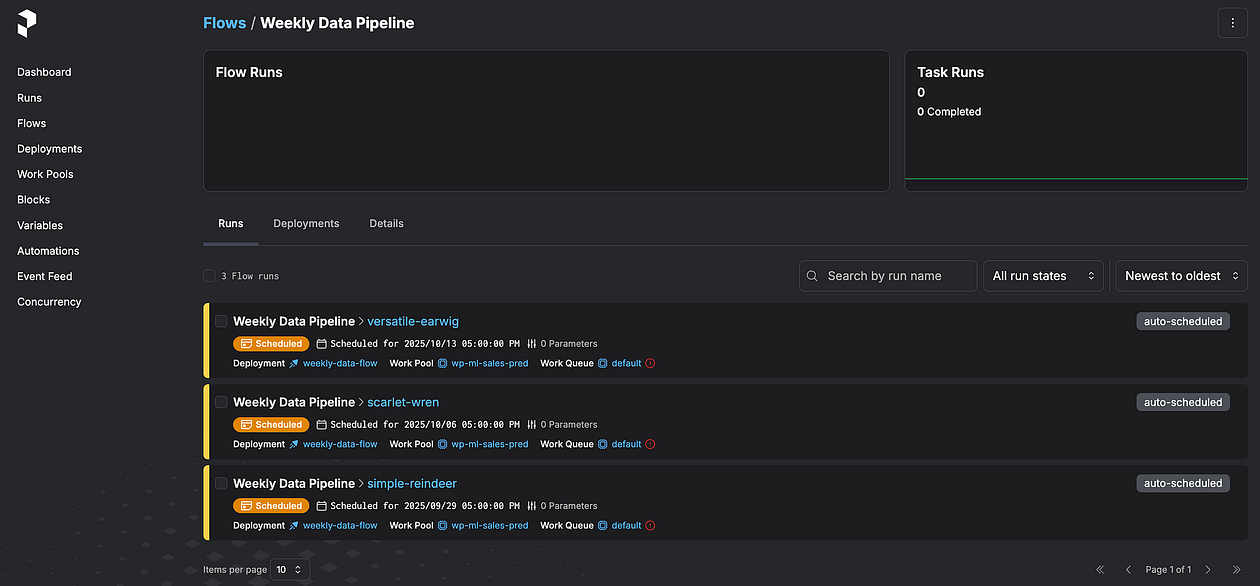
Figure D. As screenshot of the Prefect dashboard
Step 5: Deploying the Application
The final step is to deploy the entire application as a containerized Lambda by configuring the Dockerfile and the Flask application scripts.
The specific process in this final deployment step depends on the infrastructure.
But the common point is that DVC eliminates the need to store the large Parquet or CSV files directly in the feature store or model store because it caches them as lightweight hashed files.
So, first, we’ll simplify the loading logic of the Flask application script by using the dvc.api framework:
app.py:
### ... the rest components remain the same ... import dvc.api DVC_REMOTE_NAME=<REMOTE NAME IN .dvc/config file> def configure_dvc_for_lambda(): # set dvc directories to /tmp os.environ.update({ 'DVC_CACHE_DIR': '/tmp/dvc-cache', 'DVC_DATA_DIR': '/tmp/dvc-data', 'DVC_CONFIG_DIR': '/tmp/dvc-config', 'DVC_GLOBAL_CONFIG_DIR': '/tmp/dvc-global-config', 'DVC_SITE_CACHE_DIR': '/tmp/dvc-site-cache' }) for dir_path in ['/tmp/dvc-cache', '/tmp/dvc-data', '/tmp/dvc-config']: os.makedirs(dir_path, exist_ok=True) def load_x_test(): global X_test if not os.environ.get('PYTEST_RUN', False): main_logger.info("... loading x_test ...") # config dvc directories configure_dvc_for_lambda() try: with dvc.api.open(X_TEST_PATH, remote=DVC_REMOTE_NAME, mode='rb') as fd: X_test = pd.read_parquet(fd) main_logger.info('✅ successfully loaded x_test via dvc api') except Exception as e: main_logger.error(f'❌ general loading error: {e}', exc_info=True) def load_preprocessor(): global preprocessor if not os.environ.get('PYTEST_RUN', False): main_logger.info("... loading preprocessor ...") configure_dvc_for_lambda() try: with dvc.api.open(PREPROCESSOR_PATH, remote=DVC_REMOTE_NAME, mode='rb') as fd: preprocessor = joblib.load(fd) main_logger.info('✅ successfully loaded preprocessor via dvc api') except Exception as e: main_logger.error(f'❌ general loading error: {e}', exc_info=True) ### ... the rest components remain the same ... Then, update the Dockerfile to enable Docker to correctly reference the DVC components:
Dockerfile.lambda.production:
# use an official python runtime FROM public.ecr.aws/lambda/python:3.12 # set environment variables (adding dvc related env variables) ENV JOBLIB_MULTIPROCESSING=0 ENV DVC_HOME="/tmp/.dvc" ENV DVC_CACHE_DIR="/tmp/.dvc/cache" ENV DVC_REMOTE_NAME="storage" ENV DVC_GLOBAL_SITE_CACHE_DIR="/tmp/dvc_global" # copy requirements file and install dependencies COPY requirements.txt ${LAMBDA_TASK_ROOT} RUN python -m pip install --upgrade pip RUN pip install --no-cache-dir -r requirements.txt RUN pip install --no-cache-dir dvc dvc-s3 # setup dvc RUN dvc init --no-scm RUN dvc config core.no_scm true # copy the code to the lambda task root COPY . ${LAMBDA_TASK_ROOT} CMD [ "app.handler" ] Lastly, ensure the large files are ignored from the Docker container image:
.dockerignore:
### ... the rest components remain the same ... # dvc cache contains large files .dvc/cache .dvcignore # add all folders that DVC will track data/ preprocessors/ models/ reports/ metrics/ Test in Local
Finally, we’ll build and test the Docker image:
$docker build -t my-app -f Dockerfile.lambda.local . $docker run -p 5002:5002 -e ENV=local my-app app.py Upon the successful configuration, the waitress server will run the Flask application.
After confirming the changes, push the code to Git:
$git add . $git commit -m'updated dockerfiles and flask app scripts' $git push This push command triggers the CI/CD pipeline via GitHub Actions, which generates a Docker container image and pushes it to AWS ECR.
And then after a successful pipeline flow and verification, we can manually run the deployment workflow using GitHub Actions.
And that’s it!
You can learn more here: Integrating the infrastructure CI/CD pipeline to an ML application
All code is available in my GitHub repository.
The mock app is available here.
Conclusion
Building robust ML applications requires comprehensive ML lineage to ensure reliability and traceability.
In this article, you learned how to build an ML lineage by integrating open-source services like DVC and Prefect.
In practice, initial planning matters. Specifically, defining how metrics are tracked and at which stages leads directly to a cleaner, more maintainable code structure and the extensibility in the future.
Moving forward, we can consider adding more stages to the lineage and integrating advanced logic for data drift detection or fairness tests.
This will further ensure continued model performance and data integrity in the production environment.
You can check out my Portfolio / Github.
All images, unless otherwise noted, are by the author.
Source: freeCodeCamp Programming Tutorials: Python, JavaScript, Git & More.
Leave a Reply