MONIMEGA
  • Blog
    • Politics
    • Software
    • Technology
    • Business
    • Design
    • Hardware
    • Health
    • Italy
    • Music
    • Sports
    • Strategy
    • World
  • Contatto
  • Galleria
  • Informazioni
  • Servizi
  • Best free antivirus 2025: Keep your PC safe without spending a dime

    Best free antivirus 2025: Keep your PC safe without spending a dime

    December 2, 2025
    Hardware

    A lot of attention focuses on the best paid antivirus suites, but free antivirus solutions are worth talking about, too. Not only are Windows’ built-in safeguards a solid option, but the same antivirus engines behind paid third-party software power the gratis versions, too.

    So if you see a free alternative to a paid version you like, you can safely assume the antivirus protection level is similar—save for any specific malware types the free version doesn’t cover. The difference is the number of features available to you.

    To create this list of the top free antivirus programs, we looked at the top mainstream antivirus suites for Windows and selected the ones that offer a free version, as not all of them do. Then we looked at how well these suites performed in third-party detection tests. We also made sure they weren’t resource hogs, because software that slows down your PC is a pain in the rear, even when it’s free.

    In the end, our selection came down to these top free antivirus suites.
     Avast One Basic

    Pros

    • Convenient Smart Scan
    • Great basic protection
    • Flexible features

    Cons

    • Frequent pop-ups & notifications

    Best Prices Today:

    Retailer
    Price

    Free
    View Deal

    Price comparison from over 24,000 stores worldwide

    Product
    Price

    Price comparison from Backmarket

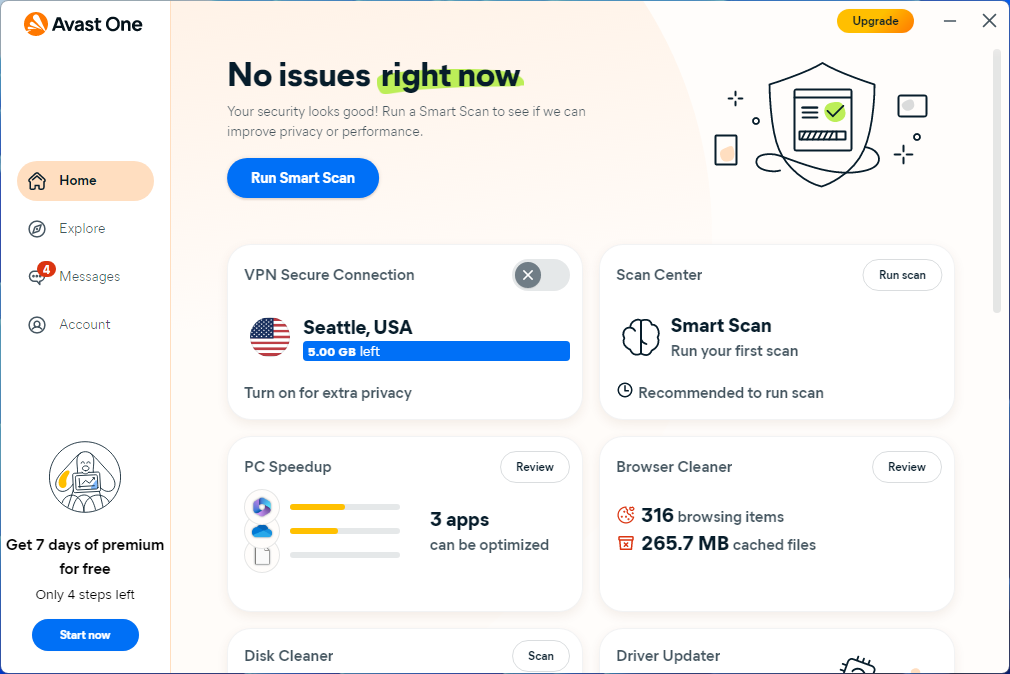
    Avast One is a very highly rated antivirus program. With the free version of this suite you can run all the various virus scans. Most of the key Avast protections are also available, such as scanning new files added to your system, watching for malicious behavior from installed programs, a web browsing shield, and an email shield.

    Avast One even allows you to inspect your network and see the devices currently connected to your home router. 

    Avast One uses a so-called smart scan to look for a variety of problems including browser threats, outdated apps, viruses and malware, and “Advanced issues” such as whether your webcam is protected from hijacking and the status of your firewall. However, the trick with those advanced issues is that to supposedly fix them, you need to start paying for the Avast One suite (about $40 per year for new subscribers).

    What you don’t get for free is phishing protection, the sandbox to separate suspicious files from your system, webcam shield, password protection, a sensitive data shield, identity protections, VPN, and PC utilities. It does, however, provide basic ransomware protection.

    As an alternative to Windows Security, Avast One is surprisingly useful in its free version and is one of the most flexible options around.

    2. Bitdefender Antivirus Free
     Bitdefender Antivirus Free

    Pros

    • Solid antivirus and malware scanning

    Cons

    • No extra features

    Best Prices Today:

    Retailer
    Price

    Free
    View Deal

    Price comparison from over 24,000 stores worldwide

    Product
    Price

    Price comparison from Backmarket

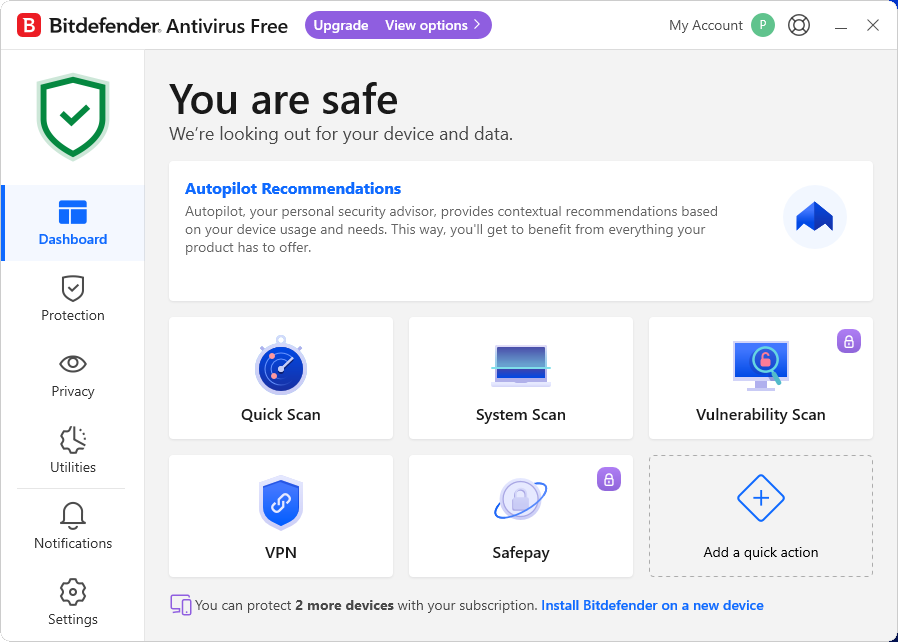
    Bitdefender’s free antivirus may have gotten a makeover, but its premise remains the same—a laser focus on guarding your PC from viruses and other malware, including web threats. You can run a quick scan or full scan, as well as create your own custom scans. VPN access is included as well, but free users are limited to just 200MB of bandwidth.

    And…that’s it for features. Everything else is kept under lock and key until you upgrade to a paid subscription. No password managers, PC tools, or additional ransomware defenses. It’s malware scanning and that’s it. Well, almost it. Bitdefender’s free edition includes anti-phishing safeguards—if you create a Bitdefender account to enable the app’s full protection.

    What distinguishes Bitdefender is its high rating from independent security organizations, with some of the highest detection rates for malware whether you’re online or off. So even though it’s light on features, it’s heavy on the most important quality you need in free antivirus.

    3. Avira Free Security
     Avira Free Security

    Pros

    • Easy to use and install
    • Unobtrusive

    Cons

    • Many features missing from free version

    Best Prices Today:

    Retailer
    Price

    Free
    View Deal

    Price comparison from over 24,000 stores worldwide

    Product
    Price

    Price comparison from Backmarket

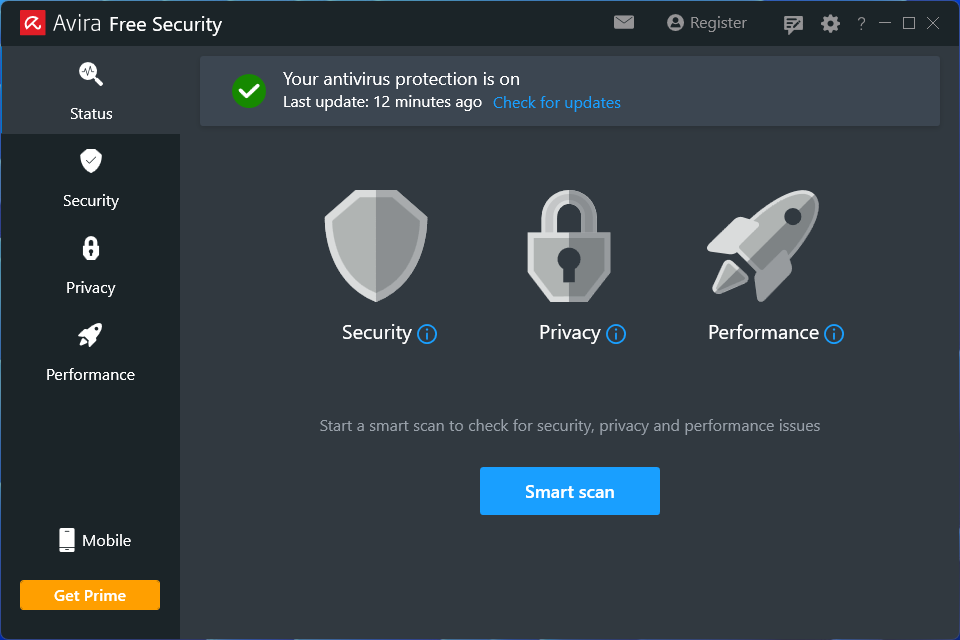
    Avira Free includes antivirus protection, a basic password manager, file shredder, and a free VPN with an allowance of 500MB per month. It’s not as full featured as Avira Prime, but it’ll do for a free suite.

    The free version scans your PC and offers real-time protection for your desktop. But it lacks protection from web threats and email threats, as well as additional ransomware protection for your device. It also lacks the improved PC cleanup feature for clearing out old files in the Pro version.

    Installation with Avira is easy, though it does prompt you to install its secure browser (completely optional), and automatically adds its Safe Shopping browser extension to already-installed browsers on your PC, like Microsoft Edge. Avira still uses more than one application for its features, with the most notable being Avira System Speedup for PC utilities and Avira Phantom VPN. If you want a free suite that splits its attention across a wider set of features, rather than concentrating on malware protection, this is the software to look at first.

    4. Windows Security
     Windows Security

    Pros

    • Excellent protection for a free security suite
    • Works out of the box

    Cons

    • Good protection, but there are higher-performing options
    • No extra features to speak of

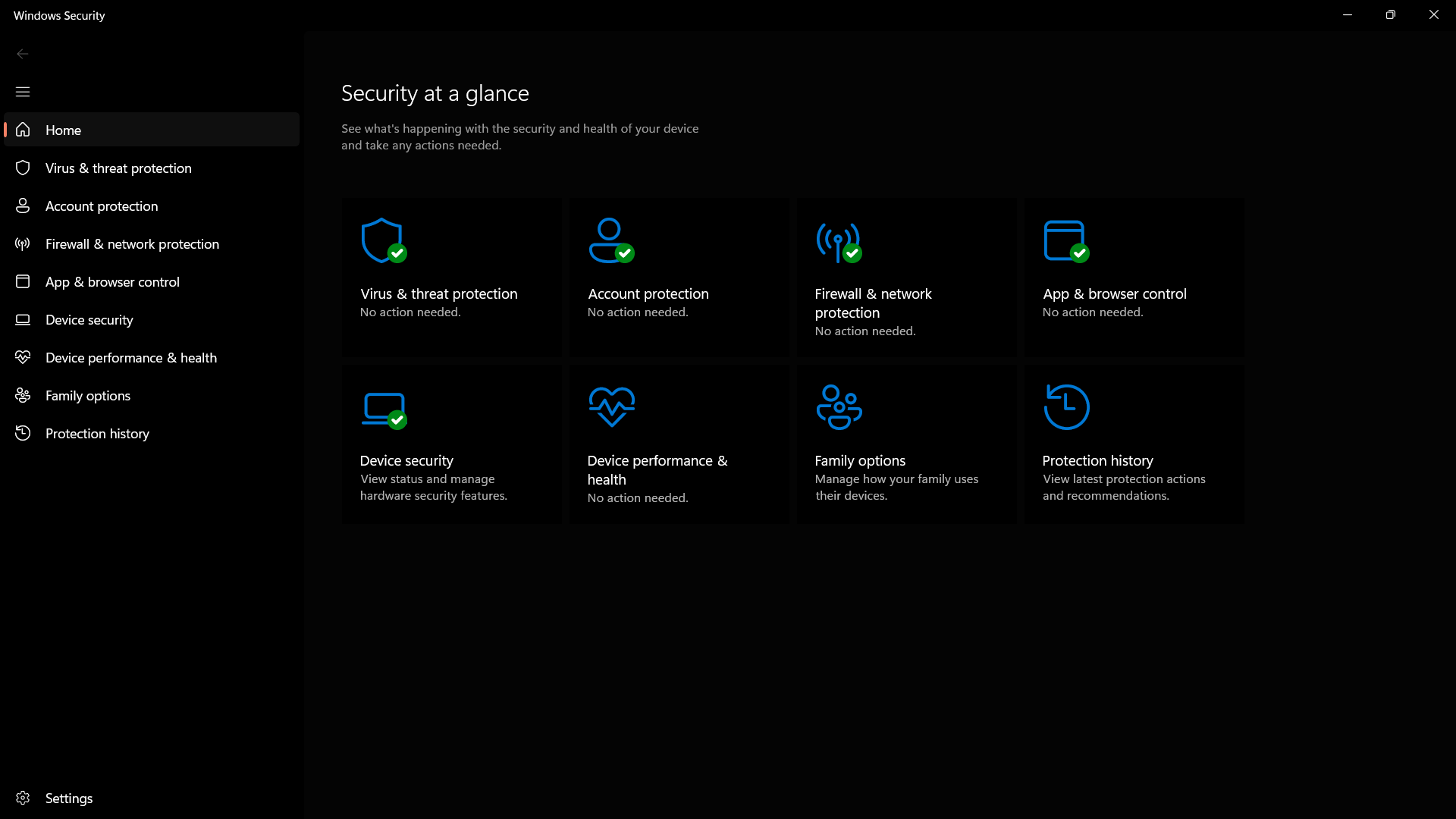
    Finally, we come to Microsoft’s built-in security solution. Long ago we wouldn’t even consider Windows Security (previously known as Windows Defender) for an article like this. Times have changed, however, and Windows Security is equaling the competition in terms of results from third-party testing houses.

    Windows Security is very good. There are third-party options that have better detection capabilities based on independent tests, but so long as you’re not visiting sketchier places on the internet, you’ll stay protected. Windows Security is active by default in Windows 10 and 11, and it works in the background ensuring you’re protected from threats.

    Read our full Windows Security review

    What you sacrifice with a free antivirus program

    As you can see, there are several capable free antivirus programs for you to choose from. Still, we feel it’s important to point out what you don’t get when you opt for a free solution. Email protection, for example, is typically a paid feature—and something that people who are extremely active in a desktop email program might care about. 

    Also missing from the free suites are enhanced security features such as file protection (to ward off ransomware attacks), a sandboxed area for opening suspicious files, a sandboxed browser for shopping protection, an enhanced firewall, monitoring for malicious behavior from installed programs, webcam monitoring, and a password manager. Identity monitoring and other privacy services like a VPN usually require a paid subscription, too.

    If, however, you’re only looking for basic antivirus protection that scans your PC and alerts you when there’s a problem, then one of these suites will do the job without costing you a cent. 

    FAQ


    1.

    Will antivirus software slow down my computer?

    Maybe, but probably not. To ensure that there is no malware or other threats present, antivirus software scans files and programs on your computer. The longer the time frame between each scan, the more files they will need to check. These more intensive scans may have some noticeable effects on your computer speed. Therefore it’s recommended that you do more frequent scans or even run them at night so it doesn’t affect your computer usage.

    While antivirus software can have some impact on the speed of your computer, it’s most likely not the only thing—or even the most prominent. Other factors such as unnecessary startup and background programs, insufficient RAM, or even undiagnosed malware can have more drastic effects on your computer speed than a simple antivirus scan.

    2.

    What should I do if my antivirus detects a threat?

    Ideally, your antivirus software will quarantine and clean the infected files for you. However, this largely depends on which antivirus program you’re using.

    In general, the antivirus will send a warning to you and try to quarantine the infected file in order to keep it from spreading. Once it has isolated the threat, the software will give you the option to remove the infection or delete the file altogether.

    3.

    What is the difference between a full scan and a quick scan?

    A full scan performs a comprehensive and thorough check of your whole system. It usually checks your system memory, startup programs, system backup, email databases, hard drives, and any removable storage drives.

    A quick scan only checks a few key areas including startup programs, system memory, and boot sectors. It may not detect all malware, but it can usually give you an idea if your computer has a virus.

    We recommend doing a full scan once per week ideally when you’re not using your computer (such as late at night). A quick scan can be done anytime but it’s usually only necessary if you notice suspicious activity on your PC.


    Source: PCWorld.

  • Best free antivirus 2025: Keep your PC safe without spending a dime

    Best free antivirus 2025: Keep your PC safe without spending a dime

    December 2, 2025
    Hardware

    A lot of attention focuses on the best paid antivirus suites, but free antivirus solutions are worth talking about, too. Not only are Windows’ built-in safeguards a solid option, but the same antivirus engines behind paid third-party software power the gratis versions, too.

    So if you see a free alternative to a paid version you like, you can safely assume the antivirus protection level is similar—save for any specific malware types the free version doesn’t cover. The difference is the number of features available to you.

    To create this list of the top free antivirus programs, we looked at the top mainstream antivirus suites for Windows and selected the ones that offer a free version, as not all of them do. Then we looked at how well these suites performed in third-party detection tests. We also made sure they weren’t resource hogs, because software that slows down your PC is a pain in the rear, even when it’s free.

    In the end, our selection came down to these top free antivirus suites.

     Avast One Basic

    Pros

    • Convenient Smart Scan
    • Great basic protection
    • Flexible features

    Cons

    • Frequent pop-ups & notifications

    Best Prices Today:

    Retailer
    Price

    Free
    View Deal

    Price comparison from over 24,000 stores worldwide

    Product
    Price

    Price comparison from Backmarket

    Avast One is a very highly rated antivirus program. With the free version of this suite you can run all the various virus scans. Most of the key Avast protections are also available, such as scanning new files added to your system, watching for malicious behavior from installed programs, a web browsing shield, and an email shield.

    Avast One even allows you to inspect your network and see the devices currently connected to your home router. 

    Avast One uses a so-called smart scan to look for a variety of problems including browser threats, outdated apps, viruses and malware, and “Advanced issues” such as whether your webcam is protected from hijacking and the status of your firewall. However, the trick with those advanced issues is that to supposedly fix them, you need to start paying for the Avast One suite (about $40 per year for new subscribers).

    What you don’t get for free is phishing protection, the sandbox to separate suspicious files from your system, webcam shield, password protection, a sensitive data shield, identity protections, VPN, and PC utilities. It does, however, provide basic ransomware protection.

    As an alternative to Windows Security, Avast One is surprisingly useful in its free version and is one of the most flexible options around.

    2. Bitdefender Antivirus Free

     Bitdefender Antivirus Free

    Pros

    • Solid antivirus and malware scanning

    Cons

    • No extra features

    Best Prices Today:

    Retailer
    Price

    Free
    View Deal

    Price comparison from over 24,000 stores worldwide

    Product
    Price

    Price comparison from Backmarket

    Bitdefender’s free antivirus may have gotten a makeover, but its premise remains the same—a laser focus on guarding your PC from viruses and other malware, including web threats. You can run a quick scan or full scan, as well as create your own custom scans. VPN access is included as well, but free users are limited to just 200MB of bandwidth.

    And…that’s it for features. Everything else is kept under lock and key until you upgrade to a paid subscription. No password managers, PC tools, or additional ransomware defenses. It’s malware scanning and that’s it. Well, almost it. Bitdefender’s free edition includes anti-phishing safeguards—if you create a Bitdefender account to enable the app’s full protection.

    What distinguishes Bitdefender is its high rating from independent security organizations, with some of the highest detection rates for malware whether you’re online or off. So even though it’s light on features, it’s heavy on the most important quality you need in free antivirus.

    3. Avira Free Security

     Avira Free Security

    Pros

    • Easy to use and install
    • Unobtrusive

    Cons

    • Many features missing from free version

    Best Prices Today:

    Retailer
    Price

    Free
    View Deal

    Price comparison from over 24,000 stores worldwide

    Product
    Price

    Price comparison from Backmarket

    Avira Free includes antivirus protection, a basic password manager, file shredder, and a free VPN with an allowance of 500MB per month. It’s not as full featured as Avira Prime, but it’ll do for a free suite.

    The free version scans your PC and offers real-time protection for your desktop. But it lacks protection from web threats and email threats, as well as additional ransomware protection for your device. It also lacks the improved PC cleanup feature for clearing out old files in the Pro version.

    Installation with Avira is easy, though it does prompt you to install its secure browser (completely optional), and automatically adds its Safe Shopping browser extension to already-installed browsers on your PC, like Microsoft Edge. Avira still uses more than one application for its features, with the most notable being Avira System Speedup for PC utilities and Avira Phantom VPN. If you want a free suite that splits its attention across a wider set of features, rather than concentrating on malware protection, this is the software to look at first.

    4. Windows Security

     Windows Security

    Pros

    • Excellent protection for a free security suite
    • Works out of the box

    Cons

    • Good protection, but there are higher-performing options
    • No extra features to speak of

    Finally, we come to Microsoft’s built-in security solution. Long ago we wouldn’t even consider Windows Security (previously known as Windows Defender) for an article like this. Times have changed, however, and Windows Security is equaling the competition in terms of results from third-party testing houses.

    Windows Security is very good. There are third-party options that have better detection capabilities based on independent tests, but so long as you’re not visiting sketchier places on the internet, you’ll stay protected. Windows Security is active by default in Windows 10 and 11, and it works in the background ensuring you’re protected from threats.

    Read our full Windows Security review

    What you sacrifice with a free antivirus program

    As you can see, there are several capable free antivirus programs for you to choose from. Still, we feel it’s important to point out what you don’t get when you opt for a free solution. Email protection, for example, is typically a paid feature—and something that people who are extremely active in a desktop email program might care about. 

    Also missing from the free suites are enhanced security features such as file protection (to ward off ransomware attacks), a sandboxed area for opening suspicious files, a sandboxed browser for shopping protection, an enhanced firewall, monitoring for malicious behavior from installed programs, webcam monitoring, and a password manager. Identity monitoring and other privacy services like a VPN usually require a paid subscription, too.

    If, however, you’re only looking for basic antivirus protection that scans your PC and alerts you when there’s a problem, then one of these suites will do the job without costing you a cent. 

    FAQ


    1.

    Will antivirus software slow down my computer?

    Maybe, but probably not. To ensure that there is no malware or other threats present, antivirus software scans files and programs on your computer. The longer the time frame between each scan, the more files they will need to check. These more intensive scans may have some noticeable effects on your computer speed. Therefore it’s recommended that you do more frequent scans or even run them at night so it doesn’t affect your computer usage.

    While antivirus software can have some impact on the speed of your computer, it’s most likely not the only thing—or even the most prominent. Other factors such as unnecessary startup and background programs, insufficient RAM, or even undiagnosed malware can have more drastic effects on your computer speed than a simple antivirus scan.

    2.

    What should I do if my antivirus detects a threat?

    Ideally, your antivirus software will quarantine and clean the infected files for you. However, this largely depends on which antivirus program you’re using.

    In general, the antivirus will send a warning to you and try to quarantine the infected file in order to keep it from spreading. Once it has isolated the threat, the software will give you the option to remove the infection or delete the file altogether.

    3.

    What is the difference between a full scan and a quick scan?

    A full scan performs a comprehensive and thorough check of your whole system. It usually checks your system memory, startup programs, system backup, email databases, hard drives, and any removable storage drives.

    A quick scan only checks a few key areas including startup programs, system memory, and boot sectors. It may not detect all malware, but it can usually give you an idea if your computer has a virus.

    We recommend doing a full scan once per week ideally when you’re not using your computer (such as late at night). A quick scan can be done anytime but it’s usually only necessary if you notice suspicious activity on your PC.


    Source: PCWorld.

  • Google announces second Android 16 release of 2025 is heading to Pixels

    Google announces second Android 16 release of 2025 is heading to Pixels

    December 2, 2025
    Hardware

    Google is following through on its pledge to split Android versions into more frequent updates. We already had one Android 16 release this year, and now it’s time for the second. The new version is rolling out first on Google’s Pixel phones, featuring more icon customization, easier parental controls, and AI-powered notifications. Don’t be bummed if you aren’t first in line for the new Android 16—Google also has a raft of general improvements coming to the wider Android ecosystem.

    Since rolling out the first version of Android in 2008, Google has largely stuck to one major release per year. Android 16 changes things, moving from one monolithic release to two. Today’s OS update is the second part of the Android 16 era, but don’t expect major changes. As expected, the first release in June made more changes. Most of what we’ll see in the second update is geared toward Google’s Pixel phones, plus some less notable changes for developers.

    Google’s new AI features for notifications are probably the most important change. Android 16 will use AI for two notification tasks: summarizing and organizing. The OS will take long chat conversations and summarize the notifications with AI. Notification data is processed locally on the device and won’t be uploaded anywhere. In the notification shade, the collapsed notification line will feature a summary of the conversation rather than a snippet of one message. Expanding the notification will display the full text.

    Read full article

    Comments


    Source: Ars Technica.

  • GPU prices are threatening to climb, but at least tariffs won't make it worse – 25% import tax on Chinese-made electronics suspended once again

    GPU prices are threatening to climb, but at least tariffs won't make it worse – 25% import tax on Chinese-made electronics suspended once again

    December 2, 2025
    Hardware

    The White House said that it will once again delay the implementation of Section 301 tariffs on Chinese-made electronics, including motherboards, PC cases, and GPUs, from November 29, 2025, to November 10, 2026, delaying potentially higher graphics cards costs for another year. The delay was announced shortly after the U.S. and China agreed on a one-year tariff truce in late October, and the Office of the U.S. Trade Representative confirmed the move before the Thanksgiving weekend.

    The Section 301 tariff was first proposed in 2018, during President Donald Trump’s first term, but it was never fully implemented as both Trump and then President Joe Biden kicked it down the line like a ticking time bomb for over seven years. The last deferment happened in late August 2025, when Washington extended the exemption until this November 29th.

    According to the U.S. Trade Representative [PDF], Trump initially applied the Section 301 tariffs as a punitive measure against China “as part of the action in the Section 301 investigation of China’s acts, policies, and practices related to technology transfer, intellectual property, and innovation.” However, it seems that its original purpose has been forgotten as the proposed tariffs became a part of the back-and-forth trade negotiations between Washington and Beijing, with the former using access to technology and the latter implementing rare-earth export controls as cards to be played in international relations.

    Aside from this, industry groups have also been hard at work lobbying against the planned import tax. Putting a 25% tariff on these computer components would certainly drive up prices, even for brands that aren’t based in China.

    For its part, the Consumer Technology Association (CTA), in a comment on the USTR website, notes that “For many of the products currently subject to exclusions, alternative sources outside of China remain constrained. While companies continue to diversify supply chains, global capacity for critical inputs and specialized components is still heavily concentrated in China.”

    And even though the tariff proposal has been around for many years, the CTA also said that “Additional time is therefore essential to enable gradual and sustainable diversification. Extending exclusions allows companies to continue operations while investing in new sourcing strategies.” CTA members, then, are getting their wish.

    While these oft-delayed Section 301 tariffs only threatened to make graphics cards more expensive, PC builders and gamers are already feeling the squeeze from market realities as the AI data center boom drives up prices of other important components, including components like DRAM and NAND.

    Stay On the Cutting Edge: Get the Tom’s Hardware Newsletter

    Get Tom’s Hardware’s best news and in-depth reviews, straight to your inbox.

    While it’s a relief to know that GPU prices won’t be worsened by the implementation of these tariffs, that’s cold comfort in a world where prices for DDR5 kits are approaching or exceeding the costs of entire systems. PC enthusiasts are still going to have to buckle up for a rough 2026 — and possibly even longer.

    Google Preferred Source

    Follow Tom’s Hardware on Google News, or add us as a preferred source, to get our latest news, analysis, & reviews in your feeds.


    Source: Latest from Tom’s Hardware.

  • Raspberry Pi raises prices, thanks to AI

    December 2, 2025
    Hardware

    Raspberry Pi is raising prices on many single-board computers, with increases going into effect immediately. The Raspberry Pi 4 and 5 modules are shooting up by $5 to $25, depending on the model and the included amount of RAM. The 16GB memory variants of the Compute Module 5 are going up by $20 and now start at $140.

    This is a bummer and we know who to thank. It’s the ultimate memory hog of all time, the AI industry.

    “The current pressure on memory prices, driven by competition from the AI infrastructure roll-out, is painful but ultimately temporary,” CEO Eben Upton wrote in a blog post. He also said that the company looks forward to “unwinding these price increases once it abates.” Once a price shoots up it doesn’t typically go down again, but we’ll cross that bridge when we get to it.

    A module.
    Raspberry Pi

    There is a spot of good news here. The company also announced a new 1GB variant of the Raspberry Pi 5 that costs just $45. This one includes a quad-core 2.4GHz Arm Cortex-A76 processor, dual-band Wi-Fi and a PCI Express slot.

    AI companies hoover up RAM like a vacuum over kitty litter and Raspberry Pi is just the latest organization to face consequences. The skyrocketing price of RAM has impacted businesses like CyberPower PC, which recently announced that there would be no holiday sales on memory products.

    Of course, AI companies also gobble up GPUs, which has placed a strain on the entire industry. But can you really put a price on an AI-created video of Pikachu getting cooked in a stew or a fake livestream? This is serious stuff that requires every iota of our water, electricity, attention and money.

    This article originally appeared on Engadget at https://www.engadget.com/ai/raspberry-pi-raises-prices-thanks-to-ai-190618469.html?src=rss


    Source: Engadget is a web magazine with obsessive daily coverage of everything new in gadgets and consumer electronics.

  • Building Ghostable & Finding Ideas by Listening Well

    Building Ghostable & Finding Ideas by Listening Well

    December 2, 2025
    Software

    It was an honor to join Matt Stauffer on the The Business of Laravel podcast to talk about my journey: from building a startup on Laravel, to selling it, and now launching Ghostable — a zero-knowledge environment-management platform for teams that scale.

    If you want the full conversation, check out the episode. Here’s a written recap of what I shared, how Laravel shaped my path, and why env/secrets management matters more than most devs realize.

    Tossing free product to crowd at Warped Tour in Asbury Park, NJ

    • My co-founder and I go way back — kindergarten friends, turned co-founders.
    • Our first “company” was literally a skateboard deck brand we made in high school: hand-painted boards, a rudimentary website, and a DIY hustle. That early taste of branding, marketing, and web dev stuck.
    • Years later, when he pitched me a security-training idea (now known as Curricula, I was on board as the builder: drawing designs by day, coding the platform by night.

    That experience — creative + code + grit — taught me that software doesn’t need a perfect launch: just momentum, iteration, and willingness to build.

    Why Laravel Was the Right Move

    • When Curricula started (around Laravel 4 era), I picked Laravel because the docs were clear, the community solid, and the day-to-day developer experience felt sustainable.
    • For much of Curricula’s life I was the only engineer — yet we ran a real product: hosting servers, workers, load balancing, billing, users, customer onboarding. Laravel + a lean, competent team allowed us to scale without bloat.

    Even during fundraising and acquisition, when some asked “Why PHP?” — what mattered was stability, team confidence, and execution. In hindsight, Laravel was possibly my smartest tech decision.

    How Ghostable Was Born

    Here’s the simple but painful truth: managing .env files, secrets, API keys, and environment configs scales badly as soon as you go beyond solo-dev.

    With a growing team or multiple services, you quickly face problems:

    • Slack or Google Docs becomes the default “secret sharing” tool — risky and messy.
    • Rotating keys, granting/revoking access, keeping everyone in sync — becomes a pain.
    • Compliance (audit trails, who changed what and when) becomes a hard requirement if you want to stay serious as you grow.

    Ghostable is built to solve exactly that. It’s a zero-knowledge platform: you get E2E encryption, versioning, access control, auditing — while keeping secrets private.

    Ghostable: What It Is (and How It Works)

    • Zero-knowledge by design — Secrets are encrypted locally before they leave your machine. On the backend you only store ciphertext + minimal metadata.
    • Multi-stack friendly — The backend is Laravel, but the client / CLI is TypeScript. Works across PHP, Node, any tech stack.
    • Env validation & safe deploys — Validate your .env before deploy (required keys, correct types, etc). Prevent live-site breakages caused by misconfigurations.
    • Audit trail & teamwork ready — Know who changed what, when; rotate keys; share securely with teammates — all without accidental leaks.

    TL;DR — If you care about dev ops and secrets for real apps

    If you’re beyond “solo dev with a .env file,” and now you’re dealing with teams, deploys, rotated keys, or compliance headaches — Ghostable might be worth a look.

    If nothing else: check out the podcast episode. Or drop me a line if you want to talk about secrets, Laravel, or building SaaS as a lean founder.

    Listen to the episode: The Business of Laravel – Building Ghostable & Finding Ideas by Listening Well

    Thanks for having me, Matt!


    Source: DEV Community.

  • Android’s new ‘Call Reason’ flags important calls before you even pick up

    Android’s new ‘Call Reason’ flags important calls before you even pick up

    December 2, 2025
    Hardware

    Android users will soon have an option to add an “urgent” indicator to their calls, which shows up on the receiver’s incoming call screen and in their call history if they don’t pick up. It’s a new feature in beta testing in the Phone by Google app, Call Reason, that will only work for people who are saved in your Contacts list already, and if you both use Google’s default calling app on Android phones. 

    If you often send calls to voicemail (or your friends don’t pick up your calls), this feature allows you to tell each other when you’re calling about something important, or need to talk right away, without sending a separate text. 

    Right now, Call Reason is just for marking calls as “urgent,” but it would also be nice to see more options down the line, like a custom message or emoji to show why you’re calling. Since the Call Reason message also shows up in your call history, it could also be a helpful reminder to call someone back about something specific if you can’t pick up in the moment.  

    Call Reason is rolling out as a beta feature, and availability will vary by phone manufacturer. You can check for the update on your phone by tapping your profile icon on the Google Play Store, “Manage apps & devices,” and “Check for updates.” You can also double-check that you’re using Phone by Google for your calls by going into your Settings app, then “Apps” and “Default apps.”


    Source: The Verge.

  • Anker’s new USB-C dock hides a detachable hub, just like an ’80s toy

    Anker’s new USB-C dock hides a detachable hub, just like an ’80s toy

    December 2, 2025
    Hardware

    Anker, a well-known name in the PC peripherals space, has a new approach to docking stations and hubs: combine them.

    Anker calls its new dock the Anker Nano Docking Station (13-in-1), and sells it for $149.99 on its website. But you don’t have to be a 1980s nerd to understand how it works. (If you are, think of Soundwave, a boombox Decepticon of Transformers fame, which hid another Decepticon in its cassette deck, like LaserBeak or Ravager.)

    In any event, Anker’s dock is both a docking station as well as a detachable hub, which neatly solves the problem of what to do with a desktop-mounted docking station when you take your laptop on the road. Anker’s 13-in-1 dock ejects a 6-in-1 hub, which you can connect directly to your laptop, too.

    It’s a neat trick, but with a couple of drawbacks: First, the whole setup is a essentially a USB-C docking station, a larger version of a USB-C hub. Anything that uses a generic USB-C port connects via its 10Gbps bus, which becomes an issue when you route multiple displays and Ethernet through it.

    USB-C docks like Anker’s solve this problem by using Display Stream Compression, a native version of data compression that exists on modern laptops, and is supported by two different DisplayPort video interfaces. DSC provides different capabilities to different laptops, however: If your dock supports DisplayPort (DP) 1.4., the dock can connect up to three displays on this dock at 1440p resolution. Those with the older DP 1.2 interface can only connect to three displays at the awkward 1600×900 resolution (or two 1080p displays), as Anker’s helpful setup video points out. Intel laptops typically made the transition between the two with the 11th-gen Core processors being the most likely to support DP 1.4.

    USB-C docking stations aren’t a bad choice, but with anything more than 10Gbps, you can notice stuttering and other issues. Thunderbolt docks, with a 40Gbps connection, are usually preferred with large, multiport docks.

    The other hitch is that the “hub” portion of the docking station simply slots into the dock itself via a single fixed USB-C plug. That’s fine for the dock, but it also means that there’s no cord for the hub portion to connect to your laptop. That means that the Anker hub portion will sit flat against your laptop. Since laptop makers typically crowd ports together, that means that the hub might end up blocking other ports on your laptop. Anker recommends you “research” this, but it’s still a gotcha to think about.

    However, Anker’s dock does include an ample collection of ports, and the hub does too. The dock also supplies 100W of power to your laptop, via a 140W charger. (The hub, however, will require a separate USB-C charger to push power through its input port.

    Anker 13-in-1 docking station

    Anker

    As The Verge notes, this hub will work with both Macs and PCs, but with different outputs depending on what sort of Mac hardware you own.


    Source: PCWorld.

  • Anker’s new USB-C dock hides a detachable hub, just like an ’80s toy

    Anker’s new USB-C dock hides a detachable hub, just like an ’80s toy

    December 2, 2025
    Hardware

    Anker, a well-known name in the PC peripherals space, has a new approach to docking stations and hubs: combine them.

    Anker calls its new dock the Anker Nano Docking Station (13-in-1), and sells it for $149.99 on its website. But you don’t have to be a 1980s nerd to understand how it works. (If you are, think of Soundwave, a boombox Decepticon of Transformers fame, which hid another Decepticon in its cassette deck, like LaserBeak or Ravager.)

    In any event, Anker’s dock is both a docking station as well as a detachable hub, which neatly solves the problem of what to do with a desktop-mounted docking station when you take your laptop on the road. Anker’s 13-in-1 dock ejects a 6-in-1 hub, which you can connect directly to your laptop, too.

    It’s a neat trick, but with a couple of drawbacks: First, the whole setup is a essentially a USB-C docking station, a larger version of a USB-C hub. Anything that uses a generic USB-C port connects via its 10Gbps bus, which becomes an issue when you route multiple displays and Ethernet through it.

    USB-C docks like Anker’s solve this problem by using Display Stream Compression, a native version of data compression that exists on modern laptops, and is supported by two different DisplayPort video interfaces. DSC provides different capabilities to different laptops, however: If your dock supports DisplayPort (DP) 1.4., the dock can connect up to three displays on this dock at 1440p resolution. Those with the older DP 1.2 interface can only connect to three displays at the awkward 1600×900 resolution (or two 1080p displays), as Anker’s helpful setup video points out. Intel laptops typically made the transition between the two with the 11th-gen Core processors being the most likely to support DP 1.4.

    USB-C docking stations aren’t a bad choice, but with anything more than 10Gbps, you can notice stuttering and other issues. Thunderbolt docks, with a 40Gbps connection, are usually preferred with large, multiport docks.

    The other hitch is that the “hub” portion of the docking station simply slots into the dock itself via a single fixed USB-C plug. That’s fine for the dock, but it also means that there’s no cord for the hub portion to connect to your laptop. That means that the Anker hub portion will sit flat against your laptop. Since laptop makers typically crowd ports together, that means that the hub might end up blocking other ports on your laptop. Anker recommends you “research” this, but it’s still a gotcha to think about.

    However, Anker’s dock does include an ample collection of ports, and the hub does too. The dock also supplies 100W of power to your laptop, via a 140W charger. (The hub, however, will require a separate USB-C charger to push power through its input port.

    Anker 13-in-1 docking station

    Anker

    As The Verge notes, this hub will work with both Macs and PCs, but with different outputs depending on what sort of Mac hardware you own.


    Source: PCWorld.

  • Comune Catanzaro, i dubbi: ente condizionato da poteri forti? Consiglio poi sublima inciucio. Ma Parisi, e diktat a Iemma, esclusi. Perché dopo Capodanno Rai a Lido, mancusiani vogliono futuro ospedale a Germaneto: il messaggio, per nuovo via libera a Nick, è chiaro!

    December 2, 2025
    Italy

    Ma che cattivoni questi giornalisti, soltanto noi in realtà perché gli altri sono tutti bravi, interessati alla polemica politica a ogni costo per… scrivere in un certo modo. E invece nel consiglio comunale di oggi (l’ennesimo straordinario dopo mesi di… latitanza), niente. Poco inchiostro da consumare, quindi. Anzi, no. O non proprio, meglio. Perché dalle 18 in poi, nell’ultima parte del civico consesso, è cambiato tutto. Un Consiglio infatti fin lì quasi da sbadigli, sublimazione dell’inciucio sinistra-destra eccetto che per Parisi e pochi altri, si è improvvisamente animato. Ma solo per la vera posta in gioco. Che, dopo l’assaggio del Capodanno Rai a Lido, è solo una: il nuovo futuro ospedale a Germaneto. È questo il messaggio, implicito, dei mancusiani (gli aventi causa di Filippo Mancuso)! Vale a dire, dateci pure l’ospedale (da collocare nell’appena citata landa desolata, che ha già tramutato in un… luogo di paura e desolazione la stazione ferroviaria) e poi saremo pronti ad aiutare e (ri)votare Nick e la sua manovrabile sinistra.

    Lo “stonato” attacco a Iemma

    Alla luce di quanto detto, non a caso si è registrato lo stonato attacco (considerato il clima generale alla… melassa) alla vicesindaco e assessore all’Urbanistica Giusy Iemma (che tutti i nostri  lettori sanno quanto “amiamo”) per la sua colpa, in verità un merito, di voler difendere, almeno finora, il Pugliese-Ciaccio insieme al Pd. Un… peccato mortale per quella grossa fetta di finta opposizione (buona parte del centrodestra: da Antonello Talerico, sempre più in scia di Mancuso dopo la constatazione di un Roberto Occhiuto pro Marco Polimeni, a tutti i “leghisti” appunto), la quale senza un Filippo candidato a sindaco in realtà sa già che tornerà a votare, come nel ‘22, il “compagno” Nicola Fiorita e la sua disponibile e addomesticabile sinistra. Un inciucione alla luce del sole, per cui Fiorita (Parisi a parte, in attesa di risolvere la grana Iemma con il Pugliese) si frega le mani per l’occasione di poter restare ancor più miracolosamente di prima al vertice di Palazzo De Nobili se nessuno lo vorrà in Parlamento. Non fosse altro perché, sapendo in cuor suo di essere un sindaco assai poco capace tenuto in piedi proprio da continue mediazioni e da tanto trasversalismo, ha bisogno del soccorso “fascioleghista”. Tanto per usare un termine caro ai suoi fedelissimi, sedicenti Kommunisti della… mazzicogna!

    L’inquietante frase di Veraldi su cui torneremo presto

    Comunque sia, come premesso, l’odierno Consiglio ha anche fatto ascoltare qualche parolina di politica, sempre per bocca di Parisi. Che ha ad esempio chiesto lumi su iniziative natalizie nel centro storico, di supporto alle attività commerciali della zona già “messe a durissima prova dallo sciagurato attuale piano della mobilità in centro e private della festa in piazza di Capodanno”. Senza contare la dichiarazione di Stefano Veraldi, che per bocca sua vivrebbe “sotto minaccia di (non meglio precisati, ndr) poteri forti” a cui si permetterebbe dunque di aggirarsi e fare pressioni in Comune. Se vero, grave. Gravissimo!


    Source: Irriverentemente.

Previous Page
1 … 5 6 7 8 9 … 911
Next Page
MONIMEGA
  • Instagram
  • Facebook
  • Twitter
Gestisci Consenso
Per fornire le migliori esperienze, utilizziamo tecnologie come i cookie per memorizzare e/o accedere alle informazioni del dispositivo. Il consenso a queste tecnologie ci permetterà di elaborare dati come il comportamento di navigazione o ID unici su questo sito. Non acconsentire o ritirare il consenso può influire negativamente su alcune caratteristiche e funzioni.
Funzionale Always active
L'archiviazione tecnica o l'accesso sono strettamente necessari al fine legittimo di consentire l'uso di un servizio specifico esplicitamente richiesto dall'abbonato o dall'utente, o al solo scopo di effettuare la trasmissione di una comunicazione su una rete di comunicazione elettronica.
Preferenze
L'archiviazione tecnica o l'accesso sono necessari per lo scopo legittimo di memorizzare le preferenze che non sono richieste dall'abbonato o dall'utente.
Statistiche
L'archiviazione tecnica o l'accesso che viene utilizzato esclusivamente per scopi statistici. L'archiviazione tecnica o l'accesso che viene utilizzato esclusivamente per scopi statistici anonimi. Senza un mandato di comparizione, una conformità volontaria da parte del vostro Fornitore di Servizi Internet, o ulteriori registrazioni da parte di terzi, le informazioni memorizzate o recuperate per questo scopo da sole non possono di solito essere utilizzate per l'identificazione.
Marketing
L'archiviazione tecnica o l'accesso sono necessari per creare profili di utenti per inviare pubblicità, o per tracciare l'utente su un sito web o su diversi siti web per scopi di marketing simili.
  • Manage options
  • Manage services
  • Manage {vendor_count} vendors
  • Read more about these purposes
Visualizza le preferenze
  • {title}
  • {title}
  • {title}