MONIMEGA
  • Blog
    • Politics
    • Software
    • Technology
    • Business
    • Design
    • Hardware
    • Health
    • Italy
    • Music
    • Sports
    • Strategy
    • World
  • Contatto
  • Galleria
  • Informazioni
  • Servizi
  • Thijs Biersteker’s Digital Sculptures Translate Climate Data into Urgent Calls to Action

    Thijs Biersteker’s Digital Sculptures Translate Climate Data into Urgent Calls to Action

    July 16, 2025
    Design

    Thijs Biersteker’s Digital Sculptures Translate Climate Data into Urgent Calls to Action

    An unassuming cacao tree in Indonesia has made a unique connection to a high-tech artwork in China. Thanks to ecological data artist Thijs Biersteker, “ORIGIN” is a sculpture — a “digital twin” — that reflects the sensors monitoring the growth and elemental experiences of the tropical tree through pulses of light.

    “When it rains in Indonesia, you see the sap flow through the sculpture in real time,” the artist says. “When the air quality shifts, the flows respond. During a heatwave, the tree visibly struggles. This real-time installation reveals just how fragile the cacao supply chain has become.”

    A majority of cacao, the primary ingredient in chocolate, is cultivated in places that are also the most vulnerable to the effects of the climate crisis. Extreme weather, habitat destruction, and other issues also mean that global food resiliency is increasingly threatened.

    For Biersteker, data provides unique insights into changes on the ground, and through a recent collaboration with the Indonesian Coffee and Cocoa Research Institute (ICCRI), he devised a way to literally illuminate environmental impacts.

    The artist collaborates with environmental scientists to explore the relationship between data and nature, harnessing science for communication and to show how every change affects biodiversity, food, and habitats. Hooking up sensors to a specimen at ICCRI’s research site in Java, Bierksteker created a translucent, sculptural mirror of the tree, which is currently installed at Zaishui Art Museum in the city of Rizhao, Shandong Province.

    Another work, “WITHER,” in collaboration with UNICEF, comprises a tropical installation with flickering leaves representing rainforest loss. Each disappearing leaf symbolizes 128 square meters of deforestation, based on data from Amazon rainforest watch groups. And “ECONTINUUM,” a collaboration with Stefano Mancuso, invites us into a kind of “conversation” occurring between tree roots in a twinkling digital composition. The work nods to recent scientific discoveries that show how trees communicate with one another via their intricate subterranean systems to provide or request nutrients or warn others of dangers like disease or infestations.

    an installation view of sculptural, white tropical leaves in a historic gallery space
    “WITHER”

    For “ORIGIN,” the live cacao tree in Java transmits information, its digital copy animating with fluctuating light. “This mirrors the role of the institutions behind it: making the invisible visible and reconnecting people with the systems that feed them,” Biersteker says in a statement. “It is where data begins to speak to the imagination and where data-driven art becomes a new language for change.”

    Explore more on Bierksteker’s website and Instagram. If you enjoy pieces that explore the intersection of data and nature, you’ll also like Marshmallow Laser Feast’s “Of the Oak” installation at Royal Botanic Gardens, Kew.

    a dual image of a cacao tree and a sculptural copy with illuminated elements
    Details of cacao tree in Java and “ORIGIN”
    a detail of a sculpture of a clear, illuminated cacao tree
    Detail of “ORIGIN”
    a detail of a sculpture of tree roots that illuminate with data
    Detail of “ECONTINUUM”
    a detail of a sculpture of a clear, illuminated cacao tree
    Detail of “ORIGIN”
    a detail of a sculpture of a clear, illuminated cacao tree
    Detail of “ORIGIN”
    an installation view of sculptural, white tropical leaves
    “WITHER”

    Do stories and artists like this matter to you? Become a Colossal Member today and support independent arts publishing for as little as $7 per month. The article Thijs Biersteker’s Digital Sculptures Translate Climate Data into Urgent Calls to Action appeared first on Colossal.


    Source: Colossal.

  • How to catch GitHub Actions workflow injections before attackers do

    How to catch GitHub Actions workflow injections before attackers do

    July 16, 2025
    Software

    You already know that security is important to keep in mind when creating code and maintaining projects. Odds are, you also know that it’s much easier to think about security from the ground up rather than trying to squeeze it in at the end of a project.

    But did you know that GitHub Actions injections are one of the most common vulnerabilities in projects stored in GitHub repositories? Thankfully, this is a relatively easy vulnerability to address, and GitHub has some tools to make it even easier.

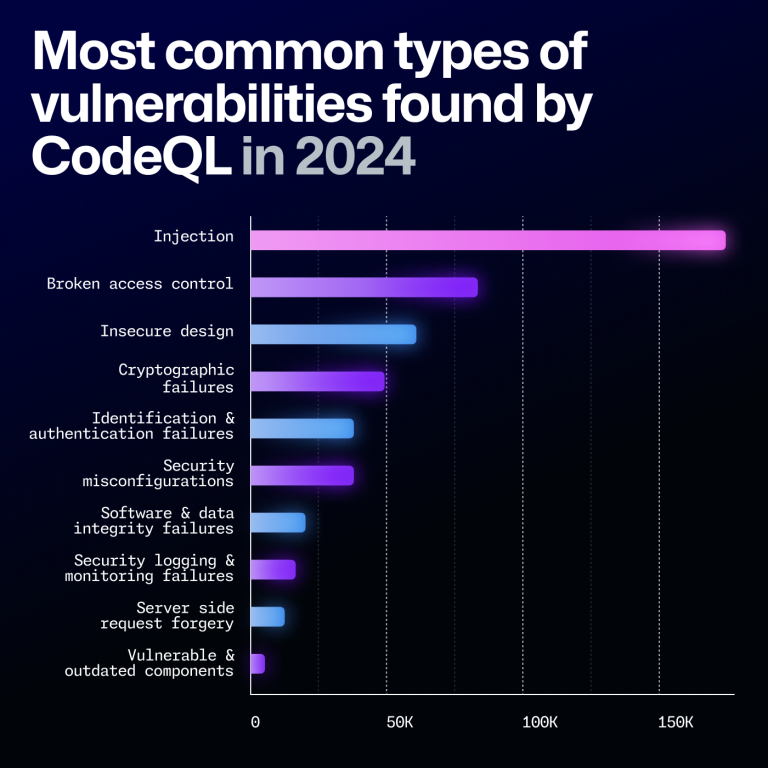
    A bar chart detailing the most common vulnerabilities found by CodeQL in 2024. In order from most to least, they are: injection, broken access control, insecure design, cryptographic failures, identification and authentication failures, security misconfigurations, software and data integrity failures, security logging and monitoring failures, server side request forgery, and vulnerable and outdated components.
    From the 2024 Octoverse report detailing the most common types of OWASP-classified vulnerabilities identified by CodeQL in 2024. Our latest data shows a similar trend, highlighting the continued risks of injection attacks despite continued warnings for several decades.

    Embracing a security mindset

    The truth is that security is not something that is ever “done.” It’s a continuous process, one that you need to keep focusing on to help keep your code safe and secure. While automated tools are a huge help, they’re not an all-in-one, fire-and-forget solution.

    This is why it’s important to understand the causes behind security vulnerabilities as well as how to address them. No tool will be 100% effective, but by increasing your understanding and deepening your knowledge, you will be better able to respond to threats. 

    With that in mind, let’s talk about one of the most common vulnerabilities found in GitHub repositories.

    Explaining actions workflow injections

    So what exactly is a GitHub Actions workflow injection? This is when a malicious attacker is able to submit a command that is run by a workflow in your repository. This can happen when an attacker controls the data, such as when they create an issue title or a branch name, and you execute that untrusted input. For example, you might execute it in the run portion of your workflow.

    One of the most common causes of this is with the ${{}} syntax in your code. In the preprocessing step, this syntax will automatically expand. That expansion may alter your code by inserting new commands. Then, when the system executes the code, these malicious commands are executed too.

    Consider the following workflow as an example:

    - name: print title
      run: echo "${{ github.event.issue.title }}"

    Let’s assume that this workflow is triggered whenever a user creates an issue. Then an attacker can create an issue with malicious code in the title, and the code will be executed when this workflow runs. The attacker only needs to do a small amount of trickery such as adding backtick characters to the title: touch pwned.txt. Furthermore, this code will run using the permissions granted to the workflow, permissions the attacker is otherwise unlikely to have.

    This is the root of the actions workflow injection. The biggest issues with actions workflow injections are awareness that this is a problem and finding all the instances that could lead to this vulnerability.

    How to proactively protect your code

    As stated earlier, it’s easier to prevent a vulnerability from appearing than it is to catch it after the fact. To that end, there are a few things that you should keep in mind while writing your code to help protect yourself from actions workflow injections.

    While these are valuable tips, remember that even if you follow all of these guidelines, it doesn’t guarantee that you’re completely protected.

    Use environment variables

    Remember that the actions workflow injections happen as a result of expanding what should be treated as untrusted input. When it is inserted into your workflow, if it contains malicious code, it changes the intended behavior. Then when the workflow triggers and executes, the attacker’s code runs.
    One solution is to avoid using the ${{}} syntax in workflow sections like run. Instead, expand the untrusted data into an environment variable and then use the environment variable when you are running the workflow. If you consider our example above, this would change to the following.

    - name: print title
      env:
        TITLE: ${{ github.event.issue.title }}
      run: echo "$TITLE"

    This won’t make the input trusted, but it will help to protect you from some of the ways attackers could take advantage of this vulnerability. We encourage you to do this, but still remember that this data is untrusted and could be a potential risk.

    The principle of least privilege is your best friend

    When an actions workflow injection triggers, it runs with the permissions granted to the workflow. You can specify what permissions workflows have by setting the permissions for the workflow’s GITHUB_TOKEN. For this reason, it’s important to make sure that your workflows are only running with the lowest privilege levels they need in order to perform duties. Otherwise, you might be giving an attacker permissions you didn’t intend if they manage to inject their code into your workflow.

    Be cautious with pull_request_target

    The impact is usually much more devastating when injection happens in a workflow that is triggered on pull_request_target than on pull_request. There is a significant difference between the pull_request and pull_request_target workflow triggers.

    The pull_request workflow trigger prevents write permissions and secrets access on the target repository by default when it’s triggered from a fork. Note that when the workflow is triggered from a branch in the same repository, it has access to secrets and potentially has write permissions. It does this in order to help prevent unauthorized access and protect your repository.

    By contrast, the pull_request_target workflow trigger gives the workflow writer the ability to release some of the restrictions. While this is important for some scenarios, it does mean that by using pull_request_target instead of pull_request, you are potentially putting your repository at a greater risk.

    This means you should be using the pull_request trigger unless you have a very specific need to use pull_request_target. And if you are using the latter, you want to take extra care with the workflow given the additional permissions.

    The problem’s not just on main

    It’s not uncommon to create several branches while developing your code, often for various features or bug fixes. This is a normal part of the software development cycle. And sometimes we’re not the best at remembering to close and delete those branches after merging or after we’ve finished working with them. Unfortunately, these branches are still a potential vulnerability if you’re using the pull_request_target trigger.

    An attacker can target a workflow that runs on a pull request in a branch, and still take advantage of this exploit. This means that you can’t just assume your repository is safe because the workflows against your main branch are secure. You need to review all of the branches that are publicly visible in your repository.

    What CodeQL brings to the table

    CodeQL is GitHub’s code analysis tool that provides automated security checks against your code. The specific feature of CodeQL that is most relevant here is the code scanning feature, which can provide feedback on your code and help identify potential security vulnerabilities. We recently made the ability to scan GitHub Actions workflow files generally available, and you can use this feature to look for several types of vulnerabilities, such as potential actions workflow injection risks. 

    One of the reasons CodeQL is so good at finding where untrusted data might be used is because of taint tracking. We added taint tracking to CodeQL for actions late last year. With taint tracking, CodeQL tracks where untrusted data flows through your code and identifies potential risks that might not be as obvious as the previous examples.

    Enabling CodeQL to scan your actions workflows is as easy as enabling CodeQL code scanning with the default setup, which automatically includes analyzing actions workflows and will run on any protected branch. You can then check for the code scanning results to identify potential risks and start fixing them. 

    If you’re already using the advanced setup for CodeQL, you can add support for scanning your actions workflows by adding the actions language to the target languages. These scans will be performed going forward and help to identify these vulnerabilities.

    While we won’t get into it in this blog, it’s important to know that CodeQL code scanning runs several queries—it’s not just good at finding actions workflow injections. We encourage you to give it a try and see what it can find. 

    While CodeQL is a very effective tool—and it is really good at finding this specific vulnerability—it’s still not going to be 100% effective. Remember that no tool is perfect, and you should focus on keeping a security mindset and taking a critical idea to your own code. By keeping this in the forefront of your thoughts, you will be able to develop more secure code and help prevent these vulnerabilities from ever appearing in the first place. 

    Future steps

    Actions workflow injections are known to be one of the most prevalent vulnerabilities in repositories available on GitHub. However, they are relatively easy to address. The biggest issues with eliminating this vulnerability are simply being aware that they’re a problem and discovering the possible weak spots in your code.

    Now that you’re aware of the issue, and have CodeQL on your side as a useful tool, you should be able to start looking for and fixing these vulnerabilities in your own code. And if you keep the proactive measures in mind, you’ll be in a better position to prevent them from occurring in future code you write.

    If you’d like to learn more about actions workflow injections, we previously published a four-part series about keeping your actions workflows secure. The second part is specifically about actions workflow injections, but we encourage you to give the entire series a read.

    Need some help searching through your code to look for potential vulnerabilities? Set up code scanning in your project today.

    The post How to catch GitHub Actions workflow injections before attackers do appeared first on The GitHub Blog.


    Source: The GitHub Blog.

  • Tiny Screens, Big Impact: The Forgotten Art Of Developing Web Apps For Feature Phones

    Tiny Screens, Big Impact: The Forgotten Art Of Developing Web Apps For Feature Phones

    July 16, 2025
    Software

    Flip phones aren’t dead. On the contrary, 200+ million non-smartphones are sold annually. That’s roughly equivalent to the number of iPhones sold in 2024. Even in the United States, millions of flip phones are sold each year. As network operators struggle to shut down 2G service, new incentives are offered to encourage device upgrades that further increase demand for budget-friendly flip phones. This is especially true across South Asia and Africa, where an iPhone is unaffordable for the vast majority of the population (it takes two months of work on an average Indian salary to afford the cheapest iPhone).

    Like their “smart” counterparts, flip phones (technically, this category is called “Feature Phones”) are becoming increasingly more capable. They now offer features you’d expect from a smartphone, like 4G, WiFi, Bluetooth, and the ability to run apps. If you are targeting users in South Asia and Africa, or niches in Europe and North America, there are flip phone app platforms like Cloud Phone and KaiOS. Building for these platforms is similar to developing a Progressive Web App (PWA), with distribution managed across several app stores.

    Jargon Busting
    Flip phones go by many names. Non-smartphones are jokingly called “dumb phones”. The technology industry calls this device category “feature phones”. Regionally, they are also known as button phones or basic mobiles in Europe, and keypad mobiles in India. They all share a few traits: they are budget phones with small screens and physical buttons.

    Why Build Apps For Flip Phones?

    It’s a common misconception that people who use flip phones do not want apps. In fact, many first-time internet users are eager to discover new content and services. While this market isn’t as lucrative as Apple’s App Store, there are a few reasons why you should build for flip phones.

    • Organic Growth
      You do not need to pay to acquire flip phone users. Unlike Android or IOS, where the cost per install (CPI) averages around $2.5-3.3 per install according to GoGoChart, flip phone apps generate substantial organic downloads.
    • Brand Introduction
      When flip phone users eventually upgrade to smartphones, they will search for the apps they are already familiar with. This will, in turn, generate more installs on the Google Play Store and, to a lesser extent, the Apple App Store.
    • Low Competition
      There are ~1,700 KaiOS apps and fewer Cloud Phone widgets. Meanwhile, Google Play has over 1.55 million Android apps to choose from. It is much easier to stand out as one in a thousand than one in a million.

    Technical Foundations

    Flip phones could not always run apps. It wasn’t until the Ovi Store (later renamed to the “Nokia Store”) launched in 2009, a year after Apple’s flagship iPhone launched, that flip phones got installable, third-party applications. At the time, apps were written for the fragmented Java 2 Mobile Edition (J2ME) runtime, available only on select Nokia models, and often required integration with poorly-documented, proprietary packages like the Nokia UI API.

    Today, flip phone platforms have rejected native runtimes in favor of standard web technologies in an effort to reduce barriers to entry and attract a wider pool of software developers. Apps running on modern flip phones are primarily written in languages many developers are familiar with — HTML, CSS, and JavaScript — and with them, a set of trade-offs and considerations.

    Hardware

    Flip phones are affordable because they use low-end, often outdated, hardware. On the bottom end are budget phones with a real-time operating system (RTOS) running on chips like the Unisoc T107 with as little as 16MB of RAM. These phones typically support Opera Mini and Cloud Phone. At the upper end is the recently-released TCL Flip 4 running KaiOS 4.0 on the Qualcomm Snapdragon 4s with 1GB of RAM.

    While it is difficult to accurately compare such different hardware, Apple’s latest iPhone 16 Pro has 500x more memory (8GB RAM) and supports download speeds up to 1,000x faster than a low-end flip phone (4G LTE CAT-1).

    Performance

    You might think that flip phone apps are easily limited by the scarce available resources of budget hardware. This is the case for KaiOS, since apps are executed on the device. Code needs to be minified, thumbnails downsized, and performance evaluated across a range of real devices. You cannot simply test on your desktop with a small viewport.

    However, as remote browsers, both Cloud Phone and Opera Mini overcome hardware constraints by offloading computationally expensive rendering to servers. This means performance is generally comparable to modern desktops, but can lead to a few quirky and, at times, unintuitive characteristics.

    For instance, if your app fetches a 1MB file to display a data table, this does not consume 1MB of the user’s mobile data. Only changes to the screen contents get streamed to the user, consuming bandwidth. On the other hand, data is consumed by complex animations and page transitions, because each frame is at least a partial screen refresh. Despite this quirk, Opera Mini estimates it saves up to 90% of data compared to conventional browsers.

    Security

    Do not store sensitive data in browser storage. This holds true for flip phones, where the security concerns are similar to those of traditional web browsers. Although apps cannot generally access data from other apps, KaiOS does not encrypt client-side data. The implications are different for remote browsers.

    Opera Mini does not support client-side storage at all, while Cloud Phone stores data encrypted in its data centers and not on the user’s phone.

    Design For Modern Flip Phones

    Simplify, Don’t Shrink-to-fit

    Despite their staying power, these devices go largely ignored by nearly every web development framework and library. Popular front-end web frameworks like Bootstrap v5 categorize all screens below 576px as extra small. Another popular choice, Tailwind, sets the smallest CSS breakpoint — a specific width where the layout changes to accommodate an optimal viewing experience across different devices — even higher at 40em (640px). Design industry experts like Norman Nielsen suggest the smallest breakpoint, “is intended for mobile and generally is up to 500px.” Standards like these advocate for a one-size-fits-all approach on small screens, but some small design changes can make a big difference for new internet users.

    Small screens vary considerably in size, resolution, contrast, and brightness.

    Small screen usability requires distinct design considerations — not a shrink-to-fit model. While all of these devices have a screen width smaller than the smallest common breakpoints, treating them equally would be a mistake.


    Most websites render too large for flip phones. They use fonts that are too big, graphics that are too detailed, and sticky headers that occupy a quarter of the screen. To make matters worse, many websites disable horizontal scrolling by hiding content that overflows horizontally. This allows for smooth scrolling on a touchscreen, but also makes it impossible to read text that extends beyond the viewport on flip phones.

    The table below includes physical display size, resolution, and examples to better understand the diversity of small screens across flip phones and budget smartphones.

    Resolution Display Size Pixel Size Example
    QQVGA 1.8” 128×160 Viettel Sumo 4G V1
    QVGA 2.4” 240×320 Nokia 235 4G
    QVGA (Square) 2.4” 240×240 Frog Pocket2
    HVGA (480p) 2.8-3.5” 320×480 BlackBerry 9720
    VGA 2.8-3.5” 480×640 Cat S22
    WVGA 2.8-3.5” 480×800 HP Pre 3
    FWVGA+ 5” 480×960 Alcatel 1

    Note: Flip phones have small screens typically between 1.8”–2.8” with a resolution of 240×320 (QVGA) or 128×160 (QQVGA). For comparison, an Apple Watch Series 10 has a 1.8” screen with a resolution of 416×496. By modern standards, flip phone displays are small with low resolution, pixel density, contrast, and brightness.

    Develop For Small Screens

    Add custom, named breakpoints to your framework’s defaults, rather than manually using media queries to override layout dimensions defined by classes.

    Bootstrap v5

    Bootstrap defines a map, $grid-breakpoints, in the _variables.scss Sass file that contains the default breakpoints from SM (576px) to XXL (1400px). Use the map-merge() function to extend the default and add your own breakpoint.

    @import "node_modules/bootstrap/scss/functions";
    $grid-breakpoints: map-merge($grid-breakpoints, ("xs": 320px));
    

    Tailwind v4

    Tailwind allows you to extend the default theme in the tailwind.config.js configuration file. Use the extend key to define new breakpoints.

    const defaultTheme = require('tailwindcss/defaultTheme')
    module.exports = {
      theme: {
        extend: {
          screens: {
            "xs": "320px",
           ...defaultTheme.screens,
             },
        },
      },
    };
    

    The Key(board) To Success

    Successful flip phone apps support keyboard navigation using the directional pad (D-pad). This is the same navigation pattern as TV remotes: four arrow keys (up, down, left, right) and the central button. To build a great flip phone-optimized app, provide a navigation scheme where the user can quickly learn how to navigate your app using these limited controls. Ensure users can navigate to all visible controls on the screen.
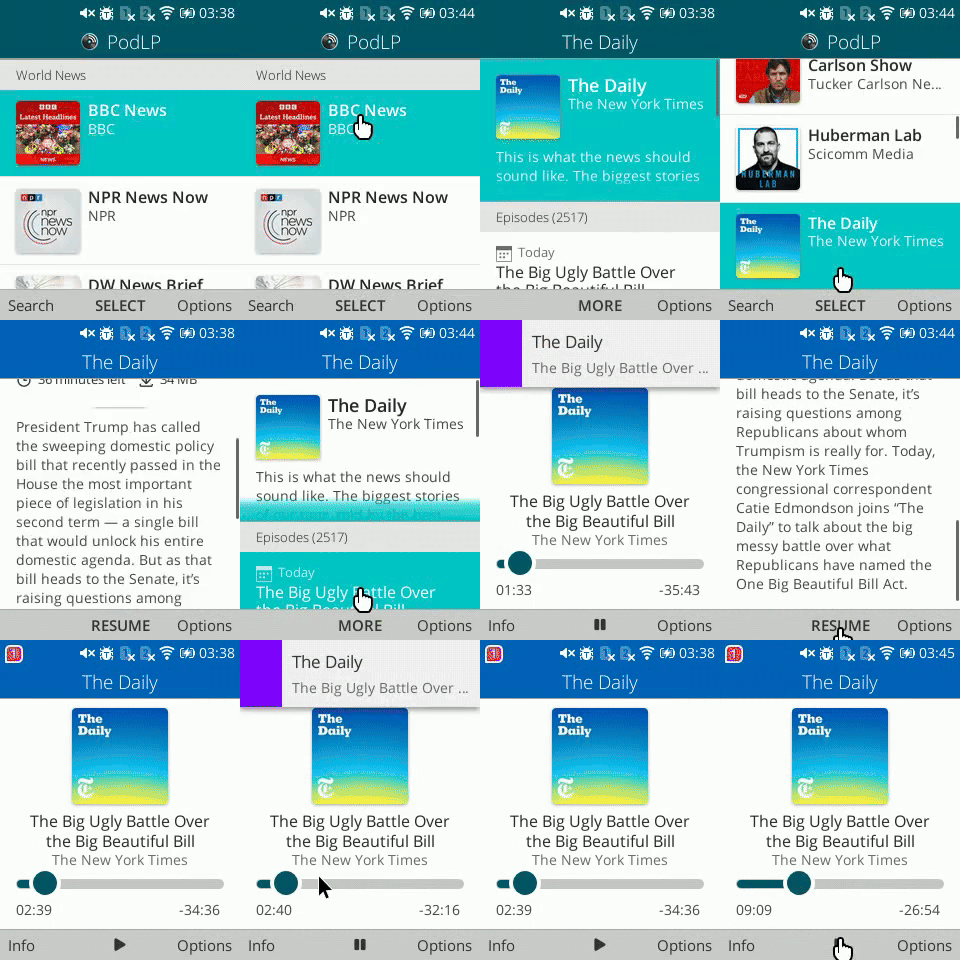
    Navigating PodLP using d-pad (left) and a virtual cursor (right).

    Although some flip phone platforms support spatial navigation using an emulated cursor, it is not universally available and creates a worse user experience. Moreover, while apps that support keyboard navigation will work with an emulated cursor, this isn’t necessarily true the other way around. Opera Mini Native only offers a virtual cursor, Cloud Phone only offers spatial navigation, and KaiOS supports both.

    If you develop with keyboard accessibility in mind, supporting flip phone navigation is easy. As general guidelines, never remove a focus outline. Instead, override default styles and use box shadows to match your app’s color scheme while fitting appropriately. Autofocus on the first item in a sequence — list or grid — but be careful to avoid keyboard traps. Finally, make sure that the lists scroll the newly-focused item completely into view.

    Don’t Make Users Type

    If you have ever been frustrated typing a long message on your smartphone, only to have it accidentally erased, now imagine that frustration when you typed the message using T9 on a flip phone. Despite advancements in predictive typing, it’s a chore to fill forms and compose even a single 180-character Tweet with just nine keys.

    Whatever you do, don’t make flip phone users type!

    Fortunately, it is easy to adapt designs to require less typing. Prefer numbers whenever possible. Allow users to register using their phone number (which is easy to type), send a PIN code or one-time password (OTPs) that contains only numbers, and look up address details from a postal code. Each of these saves tremendous time and avoids frustration that often leads to user attrition.

    Alternatively, integrate with single-sign-on (SSO) providers to “Log in with Google,” so users do not have to retype passwords that security teams require to be at least eight characters long and contain a letter, number, and symbol. Just keep in mind that many new internet users won’t have an email address. They may not know how to access it, or their phone might not be able to access emails.

    Finally, allow users to search by voice when it is available. As difficult as it is typing English using T9, it’s much harder typing a language like Tamil, which has over 90M speakers across South India and Sri Lanka. Despite decades of advancement, technologies like auto-complete and predictive typing are seldom available for such languages. While imperfect, there are AI models like Whisper Tamil that can perform speech-to-text, thanks to researchers at universities like the Speech Lab at IIT Madras.

    Flip Phone Browsers And Operating Systems

    Another challenge with developing web apps for flip phones is their fragmented ecosystem. Various companies have used different approaches to allow websites and apps to run on limited hardware. There are at least three major web-based platforms that all operate differently:

    1. Cloud Phone is the most recent solution, launched in December 2023, using a modern Puffin (Chromium) based remote browser that serves as an app store.
    2. KaiOS, launched in 2016 using Firefox OS as its foundation, is a mobile operating system where the entire system is a web browser.
    3. Opera Mini Native is by far the oldest, launched in 2005 as an ad-supported remote browser that still uses the decade-old, discontinued Presto engine).

    Although both platforms are remote browsers, there are significant differences between Cloud Phone and Opera Mini that are not immediately apparent.

    Platform Cons Pros
    Cloud Phone
    • Missing features like WebPush
    • No offline support
    • Monetization not provided
    • Modern Chromium v128+ engine
    • Rich multimedia support
    • No optimizations needed
    • Actively developed
    • 100+ models launched in 2024
    KaiOS
    • Outdated Gecko engine
    • Hardware constrained
    • Few models released in 2024
    • KaiAds integration required
    • Two app stores
    • Full offline support
    • APIs for low-level integration
    • Apps can be packaged or hosted
    Opera Mini Native
    • Discontinued Presto engine
    • ~2.5s async execution limit
    • Limited ES5 support
    • No multimedia support
    • No app store
      Last updated in 2020
    • Preinstalled on hundreds of millions of phones
    • Partial offline support
    • Stable, cross-platform

    Flip phones have come a long way, but each platform supports different capabilities. You may need to remove or scale back features based on what is supported. It is best to target the lowest common denominator that is feasible for your application.

    For information-heavy news websites, wikis, or blogs, Opera Mini’s outdated technology works well enough. For video streaming services, both Cloud Phone and KaiOS work well. Conversely, remote browsers like Opera Mini and Cloud Phone cannot handle high frame rates, so only KaiOS is suitable for real-time interactive games. Just like with design, there is no one-size-fits-all approach to flip phone development. Even though all platforms are web-based, they require different tradeoffs.

    Tiny Screens, Big Impact

    The flip phone market is growing, particularly for 4G-enabled models. Reliance’s JioPhone is among the most successful models, selling more than 135 million units of its flagship KaiOS-enabled phone. The company plans to increase 4G flip phone rollout steadily as it migrates India’s 250 million 2G users to 4G and 5G.

    Similar campaigns are underway across emerging markets, like Vodacom’s $14 Mobicel S4, a Cloud phone-enabled device in South Africa, and Viettel’s gifting 700,000 4G flip phones to current 2G subscribers to upgrade users in remote and rural areas.

    Estimates of the total active flip phone market size are difficult to come by, and harder still to find a breakdown by platform. KaiOS claims to enable “over 160 million phones worldwide,” while “over 300 million people use Opera Mini to stay connected.” Just a year after launch, Cloud Phone states that, “one million Cloud Phone users already access the service from 90 countries.” By most estimates, there are already hundreds of millions of web-enabled flip phone users eager to discover new products and services.

    Conclusion

    Hundreds of millions still rely on flip phones to stay connected. Yet, these users go largely ignored even by products that target emerging markets. Modern software development often prioritizes the latest and greatest over finding ways to affordably serve more than 2.6 billion unconnected people. If you are not designing for small screens using keyboard navigation, you’re shutting out an entire population from accessing your service.

    Flip phones still matter in 2025. With ongoing network transitions, millions will upgrade, and millions more will connect for the first time using 4G flip phones. This creates an opportunity to put your app into the hands of the newly connected. And thanks to modern remote browser technology, it is now easier than ever to build and launch your app on flip phones without costly and time-consuming optimizations to function on low-end hardware.


    Source: Articles on Smashing Magazine — For Web Designers And Developers.

  • For the Love of Code: a summer hackathon for joyful, ridiculous, and wildly creative projects

    For the Love of Code: a summer hackathon for joyful, ridiculous, and wildly creative projects

    July 16, 2025
    Software

    Code isn’t just for solving problems. It’s also for exploring ideas, expressing creativity, and building something just because it sparks joy.

    For the Love of Code is a global, summer-long hackathon for developers of all experience levels to build the project they’ve been thinking about but haven’t had a reason to start. Whether it’s a web app, CLI tool, game, AI exploration, or a creative experiment, this is your invitation to build for the fun of it — solo, with friends, or alongside GitHub Copilot.

    When

    For the Love of Code will run from July 16 to September 22, 2025.

    What you could win

    • Internet immortality: Top entries will be featured on the GitHub blog
    • 12 months of GitHub Copilot Pro+ for winners in each category
    • Glory, vibes, and an excellent excuse to finally build that thing

    The real prize is working on something you love.

    What can you build?

    Anything you want! We’ll be picking winners in six highly scientific categories. Each one is outlined below with inspiration to spark ideas and nerd-snipe you into action 🎯

    Category 1: Buttons, beeps, and blinkenlights

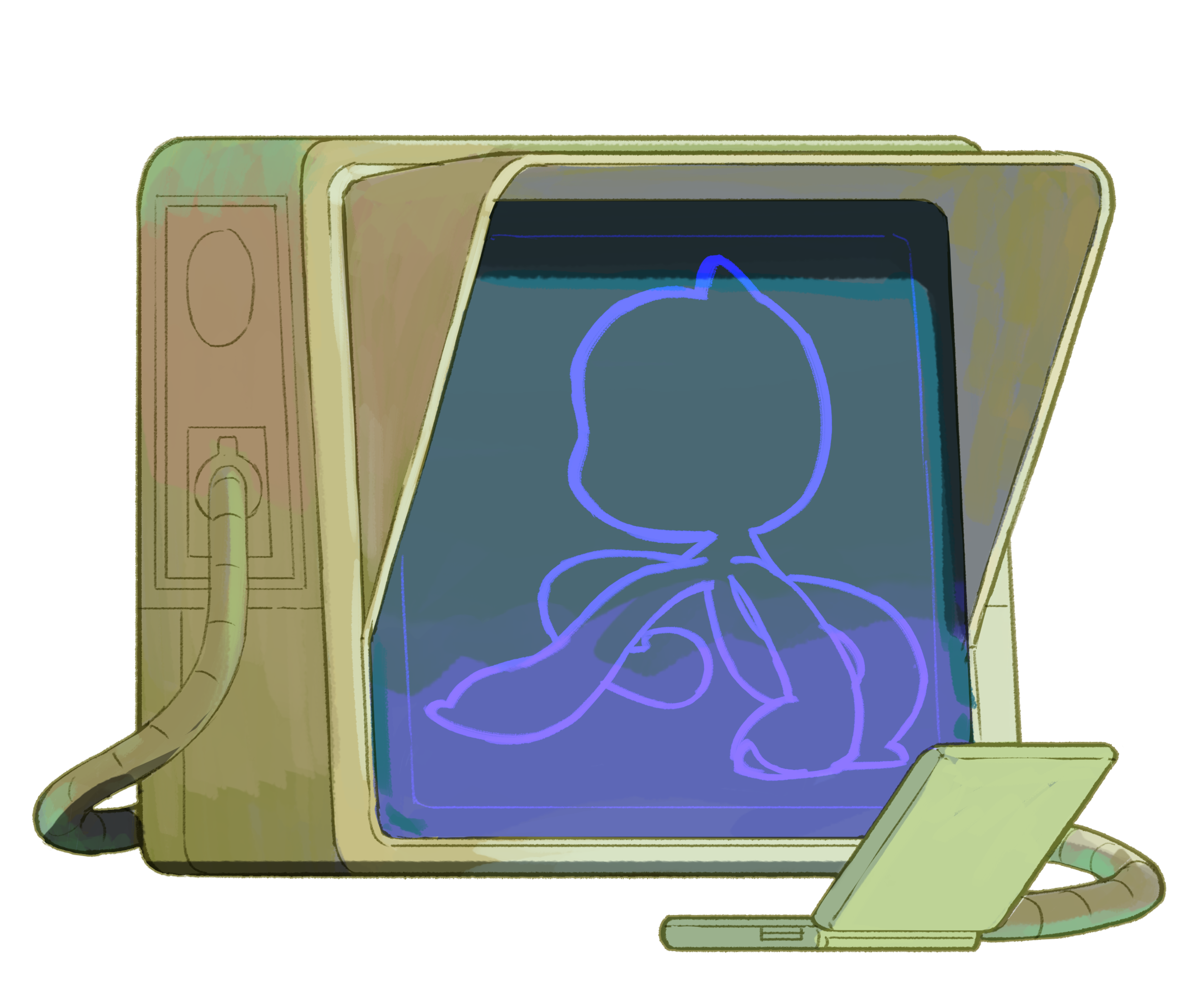
    An illustration of a retro computer screen with Mona walking acrossIf it lights up, makes noise, or looks like it escaped from a 1998 RadioShack, it belongs here. Hardware hacks (real or simulated) that blink, beep, buzz, or surprise. Think interactive, physical, tactile, and just a little chaotic. Examples:
    • A traffic light that displays your build status
    • A soldered-together sidekick that yells “LGTM!” every time your tests pass
    • An e-ink screen displaying your contribution graph – oops, this has already shipped!
    • A hack to make your screen display actual work when the webcam detects your boss approaching
    • A laptop opening and closing-powered morse code generator
    • A Rust project that visualizes guitar notes on an ESP32 T-Display ♩ ♪ ♫ ♬

    Category 2: Agents of change

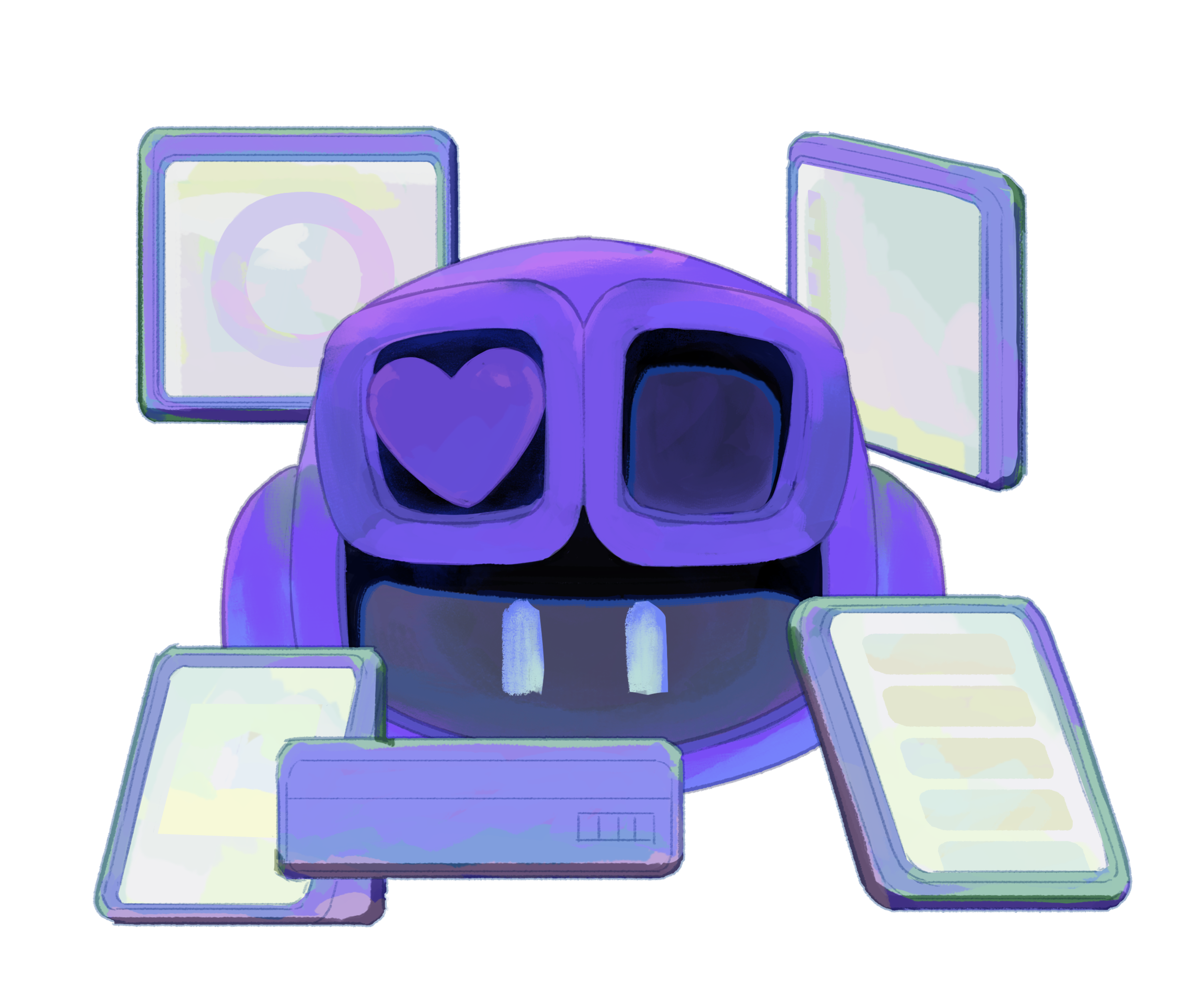
    An illustration GitHub Copilot with one of their eyes replaced with a heartAI-powered experiences, agents, or old-fashioned bots that help, hinder, or hilariously misunderstand you. Whether it’s helping automate workflows, critiquing your code like a judgmental coworker, or pretending to be your sentient toaster, this is your playground for all things assistant-y and absurd. Examples:
    • An LLM-powered changelog writer that wildly over-dramatizes every update. “Fixed minor bug” → “Vanquished a lurking menace that corrupted the sacred login flow.”
    • An agent that reviews PRs like a sarcastic senior dev, an overly nice intern, or a concerned parent: “Are you sure this function needs to be this recursive?”
    • An AI-assisted app to help split your restaurant bills
    • A Shania Twain Slack or Discord bot to inspire (Editor’s note: That don’t impress me much!)

    Category 3: Terminal talent

    An illustration of a terminal with a familiar duck characterCommand-line tools, extensions, and TUI projects that are clever, useful, or just plain fun. Serious utilities with personality, beautifully crafted interfaces, or quirky scripts that make your terminal feel more alive all belong here. If it runs in the shell and makes you smile, it belongs here. Examples:
    • A command-line karaoke machine.
    • A GitHub CLI extension that gives your daily horoscope and outlook based on issues and pull requests.
    • An interactive tool to automate that one thing that you’ve been meaning to automate for years.
    • An animated party parrot for your terminal
    • A mechanical keyboard sound simulator

    Category 4: Game on

    An illustration of a blocktacular arcade cabinet of some sort... that kinda resembles HubotCode is your controller. Build something playable, puzzling, or just plain fun. This category is for interactive experiences of all kinds, like prototyping a game idea, remixing mechanics, or mashing up genres. Think nostalgic, clever, or completely original. Fun first, functional close behind. Examples:
    • A retro-style arcade game inspired by the classics you grew up playing.
    • An adventure game with AI-generated plot twists, NPCs, and side quests.
    • A vibe-coded vertical jumper built with and featuring your favorite Copilot.
    • Yet another Flappy Bird clone, but with Octocats
    • A vertical scroller where you fall through real lines of GitHub code

    Category 5: World wide wonders

    An illustration of browser window with one of Mona's arms coming throughAny web project that makes people smile, think, learn, or click “view source” belongs here. Whether it’s your first HTML experiment, a polished tool you’ve been meaning to ship, or a playful side project that does something surprisingly useful, this is your space. Educational, delightful, impressive, or just plain fun, all kinds of web builds are welcome. Examples:

    • A web app that takes a GitHub username and roasts them based on their contributions, commit messages, and questionable emoji use 🪄 📟 🦴 💾 🫠.
    • A nostalgic 90s-style site that loads like it’s on dial-up, complete with pixel art loading bars, pop-up ads, a guestbook, and that dancing baby GIF.
    • A CAPTCHA that requires you to kill baddies in Doom
    • An an interactive, randomized retro sci-fi dashboard with an alien aesthetic Qapla’

    Category 6: Everything but the kitchen sink

    An illustration of a retro computer screen featuring a joker cardToo niche? Too specific? Hard to categorize? Perfect. This is your wild card category for all the creative projects that don’t fit neatly anywhere else. Think extensions, plugins, tools, GitHub Actions, or prototypes that turned into something unexpectedly useful. Practical, playful, or just uniquely yours, we want to see it all. Examples:

    • A Git hook that plays sitcom laugh tracks when you commit. 
    • A VS Code extension that gives your functions Yelp-style reviews.
    • A GitHub Action that refuses to deploy if your team hasn’t merged a PR with a positive emoji in the title that week.
    • A rewrite of something in Rust for the sake of it.
    • A VS Code extension to bring pets into your editor
    • YOUR AMAZING IDEA GOES HERE!

    Make it wildly useful, or just plain weird. As long as it brings you joy.

    Not sure where to start? Ask GitHub Copilot!

    You don’t have to build alone.

    GitHub Copilot isn’t just for autocomplete, it’s a creative partner that can riff with you, brainstorm ideas, explain what your code is actually doing, and more. Ask it things like:

    “Give me five fun and creative coding projects I can complete in a weekend.”

    “Help me create a Git hook that plays sitcom laugh tracks when you commit.”

    And if you want to take it further…

    We may feature standout projects that make especially creative use of Copilot, including Agent mode. It’s not required for participation, but we’ll definitely be keeping an eye out.

    Copilot can’t wait to get started with you! <3

    An excited GitHub Copilot jumping.

    Who can participate?

    Students, maintainers, weekend tinkerers, creative coders, salty seasoned pros, and curious beginners. Solo or squad. First-timer or frequent flyer. If you write code…or want to… it’s for you.

    How to join

    1. Spend an afternoon or the whole summer. Build something joyful: solo, with friends, or with Copilot.
    2. Push your code to a public GitHub repository by 11:59 p.m. Anywhere on Earth (AoE)* on September 22, 2025*.
    3. Submit your entries via the official submission form.

    * Editor’s note: We suspect Lee picked this deadline to avoid doing time zone math, and so he’d never have to explain daylight saving time again. Respect.

    Tag your progress with #ForTheLoveOfCode and we’ll feature our favorites on social and GitHub Explore page!

    Rules

    The short and sweet version:

    • The use of open source is encouraged!
    • The use of GitHub Copilot is encouraged, but optional.
    • Submit up to 42 projects. (Don’t ask why. You know why.)
    • Your project must be in a public GitHub repo with a clear README.

    Please see complete terms and conditions.

    We know… “terms and conditions” sounds like the least fun part of a joyful code challenge. But if you’re submitting a project or hoping for a prize, take a second to read the official rules. Future-you will thank you.

    We’re building a space that’s creative, collaborative, and welcoming to all. Please be excellent to each other. See our Code of Conduct.

    Judging

    A panel of GitHub Stars, Campus Experts, and staff will evaluate entries based on joyfulness, execution, technical difficulty, ingenuity, and relevance to the category. Bonus points (figuratively) for unexpected use of GitHub Copilot.

    We’ll pick three winners from each category and announce the winners by October 22, 2025 on the GitHub blog. But honestly? If it makes you smile, you’ve already won.

    New to Git, GitHub, and/or GitHub Copilot?

    For the Love of Code is the perfect opportunity to check them out (version control pun intended)!

    • Git Documentation: Learn everything about version control and how to get started.
    • GitHub Docs: Explore tutorials and FAQs about GitHub.
    • GitHub Copilot: Find out more about AI that builds with you and loves code as much as you.
    • GitHub Community Forum: This is a great place to ask questions and share answers.

    Frequently asked questions

    💡 General participation
    • Can I work with a team?
      Yes! Solo or squad… your choice. GitHub Copilot makes a great pair (or peer) programmer. Limit your team to no more than 10 people.
    • How many times can I enter?
      Up to 42 times. Don’t ask why. You know why.
    • Who can participate?
      Anyone 13 years of age or older with a GitHub account except where prohibited by law. See official rules for regional restrictions.
    • How much time should I spend?
      As much or as little as you like. Vibe code your project in an afternoon, build over a weekend, or stretch it out across the summer.
    • I’m new to GitHub/Git/Copilot. Can I still join?
      Absolutely. This is a great excuse to dive in! We’ve linked beginner-friendly docs and tutorials to help you get started.
    • Can I edit my project after the deadline?
      You can keep working on your repo forever — but for judging, we’ll look at the state of your project as of 11:59 p.m. AoE on September 22. If you want to keep improving it afterward, go for it! Just be sure the version you want judged is in place by the deadline.
    • I submitted the form but made a typo. Can I fix it?
      Yes! You can submit the form again with corrected info. We’ll just review the latest one. No need to email us in a panic.
    🛠 Projects and tools
    • Can I reuse an old idea or prototype?
      Yes, as long as your project is built (or rebuilt) during the hackathon window. Forking, remixing, and using boilerplate is encouraged.
    • Can I use paid tools, licensed software, or APIs?
      Yes! Just note any dependencies or subscriptions in your README. Do not commit sensitive info like API keys.
    • Can I use GitHub Copilot?
      Yes! Copilot is optional, but encouraged. It’s great for riffing, prototyping, debugging, or naming your weird project.
    • Can I submit something that’s not a traditional software project?
      Sure! If it involves code — hardware hacks, interactive art, generative anything — it counts. Just host it (or as much as you can) in a public GitHub repo.
    🚀 Submission and deadlines
    • Is there anything I shouldn’t build?
      Keep it respectful, safe, and fun. No NSFW content, hateful speech, or projects that violate GitHub’s Code of Conduct. Weird is good. Harmful isn’t.
    • When is the deadline?
      All entries must be submitted by 11:59 p.m. (anywhere on Earth, or UTC−12) on September 22, 2025 (“Entry Period”). Submissions accepted until it’s no longer September 22 anywhere on the planet. Off-planet submissions discouraged.
    • Do I need to share the source code?
      Yes. Submissions must be in a public GitHub repo. You can license your work however you like (see Choose a License).
    • What should I include in my README?
      Mention any tools, dependencies, paid services, or setup instructions. The better your README, the better we can appreciate your work! Please consider applying the #ForTheLoveOfCode Topic to your repo and adding screenshots, too.
    🏆 Judging and prizes
    • Who’s judging this?
      A panel of GitHub Stars, Campus Experts, and staff.
    • How are winners selected?
      We’re looking for joyful, clever, and creative projects. Bonus points (figuratively) for unexpected uses of GitHub Copilot.
    • What if I win more than one category? Do I get multiple prizes?
      That’d be amazing! But to keep things fair, we’ll likely award each participant one prize max. You’ll still get shoutouts for your other awesome entries.
    • I don’t want the prize. Can I still participate or be featured?
      Definitely. Just let us know if you’re opting out of the prize; we’ll still celebrate your project like the internet legend you are.
    • Is there cash money involved?
      Nope. But there’s Copilot Pro+, blog fame, and eternal internet glory.
    • How do you define “best use of Copilot” or “surprise awards”?
      We’re keeping it loose and fun. If you do something clever, hilarious, or surprisingly useful with Copilot, we’ll take note. Same goes for standout docs, vibes, or chaos energy. Surprise us!
    🖼 Media, demos, and showcasing
    • Do I need a video or demo?
      Not required, but highly encouraged! GIFs, screenshots, or short videos help bring your project to life. They also increase your chances of getting noticed and being featured.
    • Can I host my demo outside GitHub (e.g. itch.io, Vercel)?
      Yes! Just include the link in your README or submission form. We still need the project code in a public GitHub repo.
    • Will projects be shown on livestreams, social, or at GitHub Universe?
      Maybe! Submitting gives us permission to showcase your project if it’s selected. We’ll always give credit.

    Something not covered here? Please ask in the community discussion.

    The post For the Love of Code: a summer hackathon for joyful, ridiculous, and wildly creative projects appeared first on The GitHub Blog.


    Source: The GitHub Blog.

  • Leaping Lemurs! Global Nature Abounds in the 2025 BigPicture Competition

    Leaping Lemurs! Global Nature Abounds in the 2025 BigPicture Competition

    July 16, 2025
    Design

    Leaping Lemurs! Global Nature Abounds in the 2025 BigPicture Competition

    Across a wide, rocky gap at the Tsingy de Bemaraha Strict Nature Reserve in Madagascar, a lemur is illuminated by the sun as it leaps with its baby. Captured by Donglin Zhou, the photograph took the $5,000 Grand Prize in this year’s Big Picture Competition, highlighting a rare, daring moment as the troop emerged in search of food.

    BigPicture aims to highlight the earth’s phenomenal biodiversity and encourage important conservation efforts. Jurors reviewed thousands of entries submitted to the 12th annual contest, highlighting photographers’ unique global takes on aquatic, winged, and terrestrial life, along with landscapes, the human-nature relationship, and a creative category called “Art of Nature.”

    an aerial photo of whales swimming among ice floes
    Jonas Beyer, “The Pathfinders”

    Cast your vote by July 31 for your favorite photo as part of the 2nd annual People’s Choice Award. The BigPicture exhibition opens on October 5 at California Academy of Sciences in San Francisco, and entries for the 2026 contest will be accepted starting December 1. Follow updates on Instagram.

    an underwater photo of a newt ball
    Anton Sorokin, “California Newt Ball”
    a photo of an insect holding onto a leaf
    Clay Bolt, “The Smell of Success,” Tatama National Park, Colombia
    two rays swimming underwater, one with a white belly and the other with a black back
    Melanie Müller, “Yin Yang,” Guraidhoo, Maldives
    a pallas cat with snow caked onto its fur and face
    Mohammad Murad, “No Eyes,” Mongolia
    a white moth lands on a thistle against a blue, sunny sky
    Pål Hermansen, “Apollo,” Gotland, Sweden
    an otherworldly landscape in Morocco with palm trees in a flooded plain, with undulating sand dunes in the background
    Stelios Misinas, “Desert Flood,” Merzouga, Morocco
    a white bat takes wing from a large leaf, where its babies are nestled
    Dvir Barkay, “Leaving The Roost,” Near La Selva Biological Station, Costa Rica
    a baby elephant dips in the water underneath its parent
    Dewold Tromp, “Pure Bliss,” Chobe River, Botswana

    Do stories and artists like this matter to you? Become a Colossal Member today and support independent arts publishing for as little as $7 per month. The article Leaping Lemurs! Global Nature Abounds in the 2025 BigPicture Competition appeared first on Colossal.


    Source: Colossal.

  • Cloudflare’s Content Independence Day, Google’s Advantage, Monetizing AI

    July 16, 2025
    Strategy

    Cloudflare is unilaterally blocking AI crawlers unless they are willing to pay


    Source: Stratechery by Ben Thompson.

  • What I Took From the State of Dev 2025 Survey

    What I Took From the State of Dev 2025 Survey

    July 16, 2025
    Software

    State of Devs 2025 survey results are out! While the survey isn’t directly related to the code part of what we do for work, I do love the focus Devographics took ever since its inception in 2020. And this year it brought us some rather interesting results through the attendance of 8,717 developers, lots of data, and even more useful insights that I think everyone can look up and learn from.

    I decided to look at the survey results with an analytical mindset, but wound up pouring my heart out because, well, I am a developer, and the entire survey affects me in a way. I have some personal opinions, it turns out. So, sit back, relax, and indulge me for a bit as we look at a few choice pieces of the survey.

    And it’s worth noting that this is only part one of the survey results. A second data dump will be published later and I’m interested to poke at those numbers, too.

    An opportunity to connect

    Country or Region bar chart. USA is 26%, UK is 9%, Germany is 8%, and France is at 6%.

    One thing I noticed from the Demographics section is how much tech connects us all. The majority of responses come from the U.S. (26%) but many other countries, including Italy, Germany, France, Estonia, Austria, South Africa and many more, account for the remaining 74%.

    I mean, I am working and communicating with you right now, all the way from Nigeria! Isn’t that beautiful, to be able to communicate with people around the world through this wonderful place we call CSS-Tricks? And into the bigger community of developers that keeps it so fun?

    I think this is a testament to how much we want to connect. More so, the State of Devs survey gives us an opportunity to express our pain points on issues surrounding our experiences, workplace environments, quality of health, and even what hobbies we have as developers. And while I say developers, the survey makes it clear it’s more than that. Behind anyone’s face is someone encountering life challenges. We’re all people and people are capable of pure emotion. We are all just human.

    It’s also one of the reasons I decided to open a Bluesky account: to connect with more developers.

    I think this survey offers insights into how much we care about ourselves in tech, and how eager we are to solve issues rarely talked about. And the fact that it’s global in nature illustrates how much in common we all have.

    More women participated this year

    Bar chart breaking down developers by gender. Males are 82%, female are 15%, non-binary and hotlists do not have percentages, but represent 20 of the responses out of more than 7,000.

    From what I noticed, fewer women participated in the 2024 State of JavaScript and State of CSS fewer women (around 6%), while women represented a bigger share in this year’s State of Devs survey. I’d say 15% is still far too low to fairly “represent” an entire key segment of people, but it is certainly encouraging to see a greater slice in this particular survey. We need more women in this male-dominated industry.

    Experience over talent

    Bar chart showing income ranges based on years of experience.

    Contrary to popular opinion, personal performance does not usually equate to higher pay, and this is reflected in the results of this survey. It’s more like, the more experienced you are, the more you’re paid. But even that’s not the full story. If you’re new to the field, you still have to do some personal marketing, find and keep a mentor, and a whole bunch of stuff. Cassidy shares some nice insights on this in a video interview tracing her development career. You should check it out, especially if you’re just starting out.

    Notice that the average income for those with 10-14 of experience ($115,833) is on par with those with between 15-29 years of experience ($118,000) and not far from those with 30+ years ($120,401). Experience appears to influence income, but perhaps not to the extent you would think, or else we’d see a wider gap between those with 15 years versus those with more than double the service time.

    More than that, notice how income for the most experienced developers (30+ years) is larger on average but the range of how much they make is lower than than those with 10-29 years under their belts. I’m curious what causes that decline. Is it a lack of keeping up with what’s new? Is it ageism? I’m sure there are lots of explanations.

    Salary, workplace, and job hunting

    I prefer not drill into each and every report. I’m interested in very specific areas that are covered in the survey. And what I take away from the survey is bound to be different than your takeaways, despite numbers being what they are. So, here are a few highlights of what stood out to me personally as I combed through the results.

    Your experience, employment status, and company’s employer count seem to directly affect pay. For example, full-timers report higher salaries than freelancers. I suppose that makes sense, but I doubt it provides the full picture because freelancers freelance for a number of reasons, whether its flexible hours, having more choice to choose their projects, or having personal constraints that limit how much they can work. In some ways, freelancers are able to command higher pay while working less.

    Bad management and burnout seem to be the most talked-about issues in the workplace. Be on guard during interviews, look up reviews about the company you’re about to work for, and make sure there are far fewer complaints than accolades. Make sure you’re not being too worked up during work hours; breaks are essential for a boost in productivity.

    Seventy percent of folks reported no discrimination in the workplace, which means we’re perhaps doing something right. That said, it’s still disheartening that 30% experience some form of discrimination and lowering that figure is something we ought to aim for. I’m hoping companies — particularly the tech giants in our space — take note of this and enforce laws and policies surrounding this. Still, we can always call out discriminatory behavior and make corrections where necessary. And who’s to say that everyone who answered the survey felt safe sharing that sort of thing? Silence can be the enemy of progress.

    Never get too comfortable in your job. Although 69% report having never been laid off, I still think that job security is brittle in this space. Always learn, build, and if possible, try to look for other sources of income. Layoffs are still happening, and looking at the news, it’s likely to continue for the foreseeable future, with the U.S., Australia, and U.K. being leading the way.

    One number that jumped off the page for me is that it takes an average of four applications for most developers to find a new job. This bamboozles me. I’m looking for a full-time role (yes, I’m available!), and I regularly apply for more than four jobs in a given day. Perhaps I’m doing something wrong, but that’s also not consistent with those in my social and professional circles. I know and see plenty of people who are working hard to find work, and the number of jobs they apply for has to bring that number up. Four applications seems way low, though I don’t have the quantitative proof for it.

    Your personal network is still the best way to find a job. We will always and forever be social animals, and I think that’s why most survey participants say that coworker relationships are the greatest perk of a job. I find this to be true with my work here at CSS-Tricks. I get to collaborate with other like-minded CSS and front-end enthusiasts far and wide. I’ve developed close relationships with the editors and other writers, and that’s something I value more than any other benefits I could get somewhere else.

    Compensation is still a top workplace challenge. JavaScript is still the king of programming (bias alert), taking the top spot as the most popular programming language. I know you’re interested, that CSS came in at third.

    To my surprise, Bluesky is more popular amongst developers than X. I didn’t realize how much toxicity I’ve been exposed to at X until I opened a Bluesky account. I hate saying that the “engagement” is better, or some buzz-worthy thing like that, but I do experience more actual discussions over at Bluesky than I have for a long time at X. And many of you report the same. I hasten to say that Bluesky is a direct replacement for what X (let’s face it, Twitter) used to be, but it seems we at least have a better alternative.

    Health issues

    Bar chart showing health issues. Poor sleep is 42%, weight is 31%, mental health is 30%, and back pain is 28%.

    Without our health, we are nothing. Embrace your body for what it is: your temple. It’s a symbiotic relationship.

    — Mrs. N.

    I’m looking closer at the survey’s results on health because of the sheer number of responses that report health issues. I struggle with issues, like back pains, and that forced me to upgrade my work environment with a proper desk and chair. I tend to code on my bed, and well, it worked. But perhaps it wasn’t the best thing for my physical health.

    I know we can fall into the stereotype of people who spend 8-12 hours staring at two big monitors, sitting in a plush gaming chair, while frantically typing away at a mechanical keyboard. You know, the Hackers stereotype. I know that isn’t an accurate portrayal of who we are, but it’s easy to become that because of how people look at and understand our work.

    And if you feel a great deal of pressure to keep up with that image, I think it’s worth getting into a more healthy mindset, one that gets more than a few hours of sleep, prioritizes exercise, maintains a balanced diet, and all those things we know are ultimately good for us. Even though 20% of folks say they have no health issues at all, a whopping 80% struggle with health issues ranging from sleep deprivation to keeping a healthy weight. You are important and deserve to feel healthy.

    Think about your health the way you think about the UI/UX of the websites you design and build. It makes up a part of the design, but has the crucial role of turning ordinary tasks into enjoyable experiences, which in turn, transforms into an overall beautiful experience for the user.

    Your health is the same. Those small parts often overlooked can and will affect the great machine that is your body. Here’s a small list of life improvements you can make right now.

    Closing thoughts

    Diversity, representation, experience, income, and health. That’s what stood out to me in the 2025 State of Devs survey results. I see positive trends in the numbers, but also a huge amount of opportunity to be better, particularly when it comes being more inclusive of women, providing ample chances for upward mobility based on experience, and how we treat ourselves.

    Please check out the results and see what stands out to you. What do you notice? Is there anything you are able to take away from the survey that you can use in your own work or life? I’d love to know!


    What I Took From the State of Dev 2025 Survey originally published on CSS-Tricks, which is part of the DigitalOcean family. You should get the newsletter.


    Source: CSS-Tricks.

  • Abakus – One One

    Abakus – One One

    July 16, 2025
    Music

    • Stream ‘Anjunadeep Explorations Vol. 1’: https://exp.anjunadeep.co/exp1.oyd • Buy/Stream: https://exp.anjunadeep.co/yliw.oyd • Anjunadeep 2025: https://anjunadeep.co/deep2025.oyd • Listen to Anjunadeep Radio 24/7: https://anjunadeep.co/radio.oyd • Anjuna Music Store: https://music.anjunabeats.com/ • Anjuna Merchandise: https://store.anjunabeats.com/ • Join our newsletter for updates: https://anjunadeep.com/gb/join Abakus returns to Anjunadeep Explorations with the ‘Your Love Is So Wrong EP’. Real name Russ Davies, Abakus is one of several aliases Russ has released music under, also including Cinnamon Chasers, Aiiso, and his own name. First debuting in 2003, the Abakus alias became a home for Russ’ psychedelic-leaning downtempo and electronica output. Fast-forward 20 years, and the same distinctive sound can still be heard throughout Russ’ timeless work. In 2009, Russ saw opportunity in the simultaneously growing nu-disco and returning synthwave scenes, creating Cinnamon Chasers as an outlet for his love of melody, classic synthesisers and drum machines. The following year he landed mainstream success with ‘Luv Deluxe’, also winning the ‘Best Music Video’ award at 2010’s SXSW. Some years later in 2017, James Grant and Jody Wisternoff remixed the track, welcoming Russ into the Anjunadeep family with his own ‘Your Love Is An Echo EP’ under the Aiiso alias. After appearing as Aiiso on the first ever Anjunadeep Explorations VA compilation album in 2019, Russ later joined the Explorations label roster as Abakus with his highly acclaimed ‘Clouds EP’. He returns with a new project filled with four tracks that take his sound in a fresh direction, while still maintaining the distinctive sonic quality of an Abakus release. Abakus’ ‘Your Love Is So Wrong EP’ is out July 16 on Anjunadeep Explorations. Release date: July 15 2025 Follow Anjunadeep: • Youtube: https://anjunadeep.co/youtube.oyd • Website: http://www.anjunadeep.com • Facebook: http://www.facebook.com/anjunadeep • Twitter: http://www.twitter.com/anjunadeep • Spotify: https://anjunadeep.co/spotify.oyd • Instagram: http://www.instagram.com/anjunadeep • SoundCloud: http://soundcloud.com/anjunadeep • Reddit: https://reddit.com/r/AboveandBeyond/ • Twitch: https://www.twitch.tv/anjuna • Discord: http://www.discord.gg/anjuna • Join our newsletter: https://anjunadeep.com/signup/ Follow Anjunadeep Playlists: • Anjunadeep 2025: https://anjunadeep.co/deep2025.oyd • Anjunadeep Discography: https://anjunadeep.co/discog.oyd • Anjunadeep Essentials: https://anjunadeep.co/essentialsplaylist.oyd • Anjunadeep Explorations Discography: https://exp.anjunadeep.co/discog.oyd #Anjunadeep


    Source: YouTube.

  • Abakus – Profundities

    Abakus – Profundities

    July 16, 2025
    Music

    • Stream ‘Anjunadeep Explorations Vol. 1’: https://exp.anjunadeep.co/exp1.oyd • Buy/Stream: https://exp.anjunadeep.co/yliw.oyd • Anjunadeep 2025: https://anjunadeep.co/deep2025.oyd • Listen to Anjunadeep Radio 24/7: https://anjunadeep.co/radio.oyd • Anjuna Music Store: https://music.anjunabeats.com/ • Anjuna Merchandise: https://store.anjunabeats.com/ • Join our newsletter for updates: https://anjunadeep.com/gb/join Abakus returns to Anjunadeep Explorations with the ‘Your Love Is So Wrong EP’. Real name Russ Davies, Abakus is one of several aliases Russ has released music under, also including Cinnamon Chasers, Aiiso, and his own name. First debuting in 2003, the Abakus alias became a home for Russ’ psychedelic-leaning downtempo and electronica output. Fast-forward 20 years, and the same distinctive sound can still be heard throughout Russ’ timeless work. In 2009, Russ saw opportunity in the simultaneously growing nu-disco and returning synthwave scenes, creating Cinnamon Chasers as an outlet for his love of melody, classic synthesisers and drum machines. The following year he landed mainstream success with ‘Luv Deluxe’, also winning the ‘Best Music Video’ award at 2010’s SXSW. Some years later in 2017, James Grant and Jody Wisternoff remixed the track, welcoming Russ into the Anjunadeep family with his own ‘Your Love Is An Echo EP’ under the Aiiso alias. After appearing as Aiiso on the first ever Anjunadeep Explorations VA compilation album in 2019, Russ later joined the Explorations label roster as Abakus with his highly acclaimed ‘Clouds EP’. He returns with a new project filled with four tracks that take his sound in a fresh direction, while still maintaining the distinctive sonic quality of an Abakus release. Abakus’ ‘Your Love Is So Wrong EP’ is out July 16 on Anjunadeep Explorations. Release date: July 15 2025 Follow Anjunadeep: • Youtube: https://anjunadeep.co/youtube.oyd • Website: http://www.anjunadeep.com • Facebook: http://www.facebook.com/anjunadeep • Twitter: http://www.twitter.com/anjunadeep • Spotify: https://anjunadeep.co/spotify.oyd • Instagram: http://www.instagram.com/anjunadeep • SoundCloud: http://soundcloud.com/anjunadeep • Reddit: https://reddit.com/r/AboveandBeyond/ • Twitch: https://www.twitch.tv/anjuna • Discord: http://www.discord.gg/anjuna • Join our newsletter: https://anjunadeep.com/signup/ Follow Anjunadeep Playlists: • Anjunadeep 2025: https://anjunadeep.co/deep2025.oyd • Anjunadeep Discography: https://anjunadeep.co/discog.oyd • Anjunadeep Essentials: https://anjunadeep.co/essentialsplaylist.oyd • Anjunadeep Explorations Discography: https://exp.anjunadeep.co/discog.oyd #Anjunadeep


    Source: YouTube.

  • Abakus – Your Love Is So Wrong

    Abakus – Your Love Is So Wrong

    July 15, 2025
    Music

    • Stream ‘Anjunadeep Explorations Vol. 1’: https://exp.anjunadeep.co/exp1.oyd • Buy/Stream: https://exp.anjunadeep.co/yliw.oyd • Anjunadeep 2025: https://anjunadeep.co/deep2025.oyd • Listen to Anjunadeep Radio 24/7: https://anjunadeep.co/radio.oyd • Anjuna Music Store: https://music.anjunabeats.com/ • Anjuna Merchandise: https://store.anjunabeats.com/ • Join our newsletter for updates: https://anjunadeep.com/gb/join Abakus returns to Anjunadeep Explorations with the ‘Your Love Is So Wrong EP’. Real name Russ Davies, Abakus is one of several aliases Russ has released music under, also including Cinnamon Chasers, Aiiso, and his own name. First debuting in 2003, the Abakus alias became a home for Russ’ psychedelic-leaning downtempo and electronica output. Fast-forward 20 years, and the same distinctive sound can still be heard throughout Russ’ timeless work. In 2009, Russ saw opportunity in the simultaneously growing nu-disco and returning synthwave scenes, creating Cinnamon Chasers as an outlet for his love of melody, classic synthesisers and drum machines. The following year he landed mainstream success with ‘Luv Deluxe’, also winning the ‘Best Music Video’ award at 2010’s SXSW. Some years later in 2017, James Grant and Jody Wisternoff remixed the track, welcoming Russ into the Anjunadeep family with his own ‘Your Love Is An Echo EP’ under the Aiiso alias. After appearing as Aiiso on the first ever Anjunadeep Explorations VA compilation album in 2019, Russ later joined the Explorations label roster as Abakus with his highly acclaimed ‘Clouds EP’. He returns with a new project filled with four tracks that take his sound in a fresh direction, while still maintaining the distinctive sonic quality of an Abakus release. Abakus’ ‘Your Love Is So Wrong EP’ is out July 16 on Anjunadeep Explorations. Release date: July 15 2025 Follow Anjunadeep: • Youtube: https://anjunadeep.co/youtube.oyd • Website: http://www.anjunadeep.com • Facebook: http://www.facebook.com/anjunadeep • Twitter: http://www.twitter.com/anjunadeep • Spotify: https://anjunadeep.co/spotify.oyd • Instagram: http://www.instagram.com/anjunadeep • SoundCloud: http://soundcloud.com/anjunadeep • Reddit: https://reddit.com/r/AboveandBeyond/ • Twitch: https://www.twitch.tv/anjuna • Discord: http://www.discord.gg/anjuna • Join our newsletter: https://anjunadeep.com/signup/ Follow Anjunadeep Playlists: • Anjunadeep 2025: https://anjunadeep.co/deep2025.oyd • Anjunadeep Discography: https://anjunadeep.co/discog.oyd • Anjunadeep Essentials: https://anjunadeep.co/essentialsplaylist.oyd • Anjunadeep Explorations Discography: https://exp.anjunadeep.co/discog.oyd #Anjunadeep


    Source: YouTube.

Previous Page
1 … 895 896 897 898 899 … 911
Next Page
MONIMEGA
  • Instagram
  • Facebook
  • Twitter
Gestisci Consenso
Per fornire le migliori esperienze, utilizziamo tecnologie come i cookie per memorizzare e/o accedere alle informazioni del dispositivo. Il consenso a queste tecnologie ci permetterà di elaborare dati come il comportamento di navigazione o ID unici su questo sito. Non acconsentire o ritirare il consenso può influire negativamente su alcune caratteristiche e funzioni.
Funzionale Always active
L'archiviazione tecnica o l'accesso sono strettamente necessari al fine legittimo di consentire l'uso di un servizio specifico esplicitamente richiesto dall'abbonato o dall'utente, o al solo scopo di effettuare la trasmissione di una comunicazione su una rete di comunicazione elettronica.
Preferenze
L'archiviazione tecnica o l'accesso sono necessari per lo scopo legittimo di memorizzare le preferenze che non sono richieste dall'abbonato o dall'utente.
Statistiche
L'archiviazione tecnica o l'accesso che viene utilizzato esclusivamente per scopi statistici. L'archiviazione tecnica o l'accesso che viene utilizzato esclusivamente per scopi statistici anonimi. Senza un mandato di comparizione, una conformità volontaria da parte del vostro Fornitore di Servizi Internet, o ulteriori registrazioni da parte di terzi, le informazioni memorizzate o recuperate per questo scopo da sole non possono di solito essere utilizzate per l'identificazione.
Marketing
L'archiviazione tecnica o l'accesso sono necessari per creare profili di utenti per inviare pubblicità, o per tracciare l'utente su un sito web o su diversi siti web per scopi di marketing simili.
  • Manage options
  • Manage services
  • Manage {vendor_count} vendors
  • Read more about these purposes
Visualizza le preferenze
  • {title}
  • {title}
  • {title}